

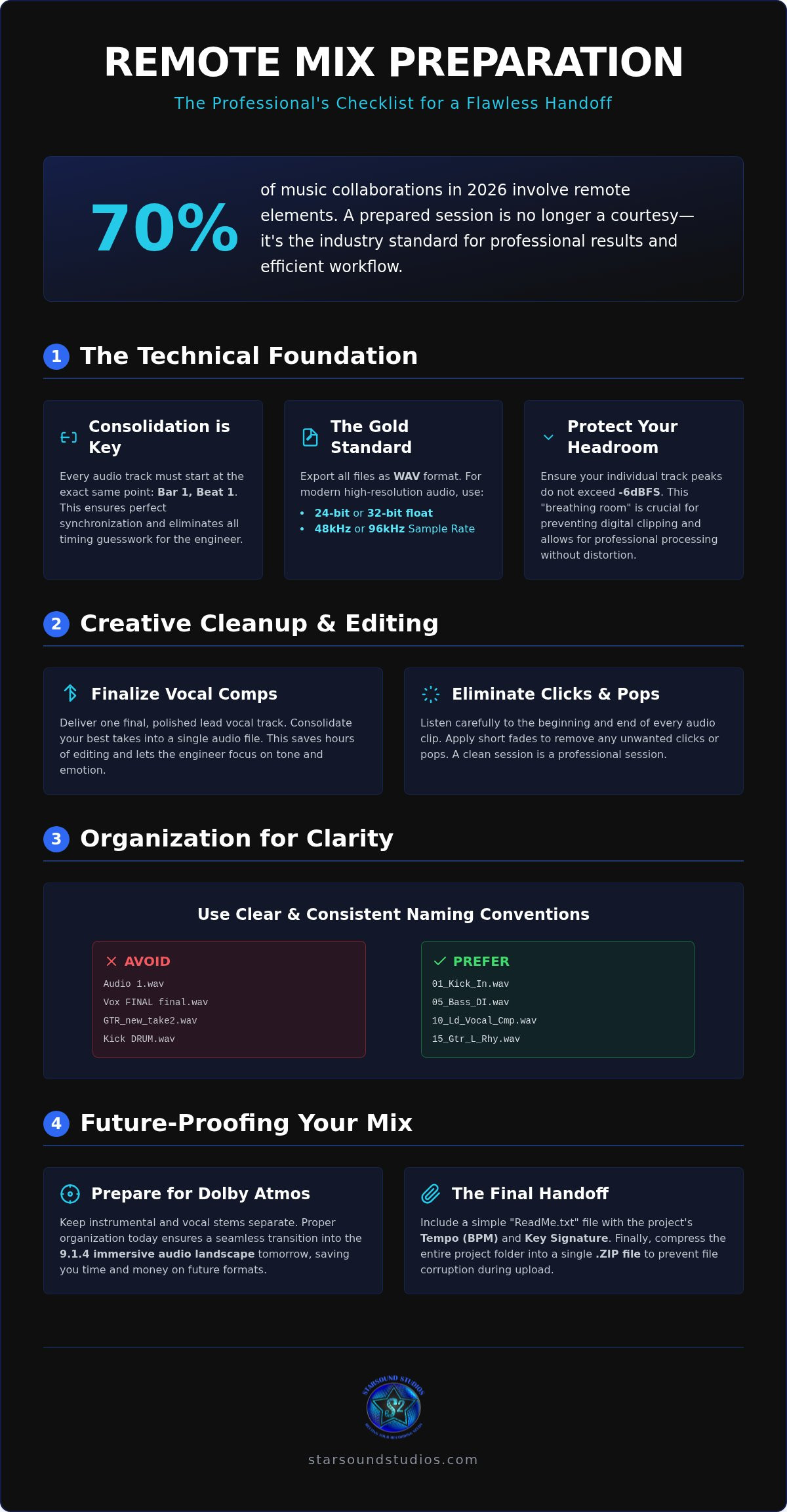
Did you know that 70% of music collaborations in 2026 now involve remote elements? This digital shift has turned the home studio into a global launchpad, yet the bridge between a raw recording and a radio-ready hit is often paved with technical friction. You’ve poured your soul into every frequency; the last thing you want is to waste your budget on file cleanup or lose your creative soul during the handoff. Mastering how to prepare tracks for remote mixing is the ultimate insurance policy for your art. It’s the difference between an engineer who fights your session and one who is inspired by it.
We believe technical precision should serve your passion, not stifle it. You deserve a stress-free handover that honors your vision while reaching the absolute peak of sonic fidelity. This guide reveals the exact technical and creative steps to prep your session so your engineer can focus on the masterpiece. We’ll cover the 2026 standards for file formats, sample rates, and stem organization. From protecting your headroom to articulating your artistic intent, you’ll gain the confidence to send your work into the world knowing it’s ready for a world-class finish.
Key Takeaways
- Learn exactly how to prepare tracks for remote mixing by consolidating every file to Bar 1, Beat 1 to ensure perfect synchronization across any workstation.
- Protect your sonic fidelity by standardizing your session with 24-bit or 32-bit float WAV files, the industry gold standard for modern high-resolution audio.
- Maximize your engineer’s creative energy by delivering polished vocal comps and clean edits, eliminating clicks and pops before the session begins.
- Future-proof your project for the 9.1.4 immersive landscape by keeping stems separate and organized for a seamless transition into Dolby Atmos mixing.
- Ensure a flawless handover by including a detailed "ReadMe" file with tempo and key data, then archiving your folder to prevent file corruption during upload.
Why Track Preparation is the Secret to a Radio-Ready Sound
Production is a whirlwind of raw inspiration. It's messy. It's beautiful. It's visceral. But when you transition to the mixing phase, that creative storm must be distilled into technical precision. Many creators cling to the "fix it in the mix" myth, assuming a professional engineer can magically repair poorly tracked elements or disorganized sessions. Truthfully, preparation is the silent architect of every radio-ready hit. Mastering how to prepare tracks for remote mixing means you aren't just cleaning up files; you're clearing the path for sonic greatness.
The evolution of Multitrack recording has given us infinite creative freedom, yet it often leaves behind a trail of digital clutter. If your session arrives as a labyrinth of unnamed clips and mismatched sample rates, your engineer is forced to spend half their time on technical triage. We believe in a different rhythm. Organized tracks allow your engineer to dedicate 90% of their energy to the art of the mix, sculpting the frequency spectrum and building an immersive world for your listeners. It's about maximizing the value of every billable hour to ensure your budget goes toward creative polish rather than basic file management.
The Cost of Unprepared Sessions
In a high-end studio environment, time is your most precious currency. Wasted hours spent hunting for missing audio files or troubleshooting sync issues are hours stolen from the soul of your song. Engineers thrive on the momentum of a clean handover. It allows them to tap into the "vibe" of your performance immediately, rather than getting bogged down in the mechanics of the DAW. Remote Mixing Prep is the bridge between home recording and professional distribution. By eliminating technical friction, you ensure that the final energy of your track remains vibrant and focused.
Setting the Collaborative Tone
Your session files serve as a digital handshake. A meticulously organized project signals a high level of professionalism and respect for the craft. This clarity inspires your mixing engineer to lean in and treat your work with the same reverence you do. It shifts the dynamic from a mere service provider to a collaborative mentor relationship. When you enter the mix phase with confidence rather than anxiety, you create a safe space for artistic risks. Establishing this clear vision before the first fader moves ensures the final product is a true reflection of your identity.
The Technical Foundation: Consolidation and File Management
Precision is the bedrock of world-class art. Before the first fader moves, your session needs a technical handshake that ensures every element is perfectly aligned and ready for the spotlight. Learning how to prepare tracks for remote mixing starts with the absolute non-negotiable: consolidation. Every single track in your project must be exported from the exact same starting point, typically Bar 1, Beat 1. This ensures that when your engineer imports your files into their DAW, the timing relationships you worked so hard to create remain flawless. Without this, your lead vocal might drift, or your snare might lose its pocket, forcing the engineer to play a guessing game with your rhythm. For a deeper dive into the mechanics of this process, the guide on consolidating and exporting tracks offers excellent DAW-specific workflows.
High-fidelity results require high-fidelity ingredients. We live in an era of 24-bit and 32-bit float WAV files, which are the industry gold standard for a reason. These formats preserve the intricate details of your recording, providing the dynamic range necessary for professional processing. While 44.1kHz was once the norm, 2026 standards favor 48kHz or 96kHz for superior audio resolution. Beyond the format, you must respect the headroom. Aim for your peaks to hit around -6dB. This "breathing room" prevents digital clipping and gives your mixer the space they need to apply analog-style saturation or aggressive compression without degrading the signal. If you're looking for a partner who values this level of detail, our remote mixing experts are ready to transform your raw files into a polished masterpiece.
Naming Conventions for Seamless Engineering
Clarity is kindness in the studio. A session filled with files named "Audio 1" or "Lead Vox Final 2 NEW" is a recipe for errors and wasted time. Use a logical formula like "Track Number - Instrument - Detail" (e.g., 01_Kick_In_D12). This allows your engineer to see the structure of the song at a glance. Group your tracks logically by instrument family: drums first, followed by bass, guitars, keys, and finally, your vocal stacks. This organization keeps the creative momentum high and ensures no detail is overlooked during the sonic build.
Exporting Dry vs. Wet Stems
The "Golden Rule" of track prep is simple: remove utility plugins but keep creative ones. If an EQ or compressor is just there to "clean things up," bypass it. Your engineer has world-class tools for that. However, if a specific delay, synth filter, or distortion is essential to the character of the sound, keep it. When in doubt, provide both a dry and a wet version of the track. Finally, always commit your MIDI tracks to audio. This eliminates any issues with missing virtual instruments or patch changes, ensuring the sound you heard in your studio is exactly what reaches our ears.
Creative Cleanup: Editing and Comping Best Practices
Creative cleanup is where your artistic intent meets technical discipline. While the previous section focused on the skeletal structure of your files, editing is about the skin and soul of the performance. When you're figuring out how to prepare tracks for remote mixing, you must decide which creative choices are yours to finalize. Comping is the first hurdle. Don't send a folder of 50 vocal playlists. Instead, deliver the "perfect take" that represents your best performance. This allows your engineer to focus on the sonic texture rather than wondering if you preferred the vibrato in take three or the grit in take twelve.
Precision editing also means hunting down digital artifacts. Every edit point needs a fade or crossfade to eliminate the clicks and pops that can ruin a quiet passage. Similarly, stripping silence from your tracks removes the accumulated room hum and headphone bleed that muddies a mix. While modern Online collaboration features make it easier to share large sessions, they don't replace the need for clean audio. If you want a vocal tuned with a specific "Auto-Tune" aesthetic, commit that sound before sending. You understand your "vibe" better than anyone; handling your own pitch correction ensures your creative identity remains intact.
Managing AI-Assisted Cleanup
In 2026, AI de-noisers and stem-separation tools are everywhere. They're powerful, but they can be dangerous. If you've used AI to repair a noisy guitar track or isolate a vocal, tell your mixer. These tools often introduce subtle phase issues or robotic artifacts that only become apparent when the mix is pushed. Transparency allows us to monitor these tracks closely and ensure the processing hasn't compromised the song's emotional weight. We want your music to feel human, even when the latest tech helps us reach that goal.
The Importance of the Rough Mix
Your mixer isn't a mind reader. Providing a rough mix is essential because it shows us your current balance goals and aesthetic direction. At Starsound Studios, Steve "The Mix" uses your rough demo as a North Star, ensuring the final world-class product aligns with your original spirit. Along with your demo, include 2-3 professional reference tracks. These aren't just "good songs"; they're sonic blueprints that help us understand the low-end weight, vocal intimacy, or spatial depth you're aiming for. This alignment turns a standard service into a true creative partnership.
Preparing for the Future: Dolby Atmos and Immersive Audio
The transition from a traditional stereo field to the 9.1.4 immersive landscape is more than a technical upgrade; it's a shift in artistic philosophy. In a standard stereo mix, you are working within a flat plane. In Dolby Atmos, you are building an architectural world where sound has height, depth, and movement. When you analyze how to prepare tracks for remote mixing for an immersive project, the primary rule is separation. While you might bake your backing vocals or percussion into a single stereo pair for a traditional mix, Atmos thrives on individual elements. We need those tracks separate so we can place them as "objects" that dance around the listener, rather than keeping them trapped in a static bed.
Starsound Studios stands as Ohio’s only Dolby-certified 9.1.4 facility. This distinction means our room is tuned to the highest global standards for immersive audio, making your preparation even more critical. Whether you are a local Cleveland artist or a remote creator from across the globe, Steve "The Mix" works to ensure your vision translates perfectly to this new medium. Preparing for Atmos requires an "Immersive Mindset" during your export process. You aren't just sending files; you are sending the building blocks of a 3D experience. If you are ready to elevate your project, our Dolby Atmos mixing services provide the precision and passion your music deserves.
Stem Organization for Immersive Depth
Organizing for Atmos involves a different logic than stereo. You must decide which elements belong in the "bed" (the foundational speakers) and which should be "objects" (sounds that can move freely in 3D space). To achieve the best results, keep your processing light. Heavy compression or baked-in stereo reverb can fight the spatial placement in the Atmos renderer. We also recommend providing a "Stereo Intent" master. This gives our engineers a clear reference of your original balance, ensuring the immersive version honors the soul of the stereo release while expanding its boundaries.
Communicating Spatial Vision
Describing a 3D space requires a new vocabulary. We encourage you to use sensory words like "warm," "soaring," or "enveloping" to describe your goals. Are you looking for a "natural" room sound that feels like a live performance in a cathedral? Or do you want an "experimental" experience where synths spiral overhead and percussion hits from every corner? Clear communication about where you want sounds to "live" allows us to bridge the gap between your home-tracked vision and a world-class immersive product. This collaborative approach ensures that every frequency serves the emotional arc of your song.
The Final Handover: Delivery to Starsound Studios
The handover is the culmination of your creative journey. You've distilled your vision into high-resolution files; now it's time to ensure they arrive with their integrity intact. Understanding how to prepare tracks for remote mixing concludes with a meticulous delivery process that protects your data and your art. The most critical, yet often overlooked, component is the ReadMe file. This document acts as the technical brain of your session. Include the tempo (BPM), the key signature, and specific song notes that describe the emotional arc of the track. If there's a particular moment where the bass should feel "submerged" or the vocals should "shimmer," this is where you tell us.
Before you upload, always ZIP and archive your session folder. Digital transfer can be volatile; compression acts as a shield against file corruption during the journey through the cloud. We prefer using secure, high-speed delivery methods like Dropbox or private servers to handle your 24-bit assets. This ensures that the fidelity you've worked so hard to capture in your home sanctuary is exactly what we hear in our Dolby-certified suite. This final step isn't just about logistics; it's about handing over the keys to your masterpiece with total confidence.
The Submission Checklist for Serious Artists
A final scan is your insurance policy. Before hitting send, run through these essential checks to guarantee a flawless intake at our facility:
- Check 1: Does every track start at 0:00? Timing is everything; ensure perfect sync across all files so the pocket remains exactly as you intended.
- Check 2: Are all MIDI tracks converted to WAV? Commit your virtual instruments to audio so your unique sounds are preserved.
- Check 3: Is the ReadMe file included with the BPM and Key? Give your engineer the map they need to start the creative work immediately.
- Check 4: Are the files named clearly and numbered? Logical organization prevents errors and keeps the session momentum high.
What Happens After You Hit Send?
Once your project reaches Starsound Studios, the intake process begins. Steve "The Mix" personally reviews your session to ensure every file meets our high-fidelity standards. We don't just "run" your mix; we inhabit it. You'll receive confirmation that your project is in our capable hands, followed by a collaborative dialogue as the sonic landscape takes shape. We prioritize your comfort and inspiration, offering a structured revision process to ensure the final product is radio-ready and world-class. If you're ready to bridge the gap between your home recording and a professional release, book a session at our North Royalton recording studio and let's begin the transformation.
Elevate Your Vision to Radio-Ready Excellence
Your music is more than just a collection of digital files; it's the culmination of your creative spirit and technical dedication. By mastering how to prepare tracks for remote mixing, you ensure that every frequency and every emotion translates perfectly from your home studio to the global stage. You've learned that clean consolidation, thoughtful editing, and clear communication are the pillars of a successful handoff. These steps allow your engineer to skip the technical triage and dive straight into the artistry of your sound.
Starsound Studios provides a welcoming, creative sanctuary where the science of audio meets the soul of your work. As Ohio’s only 9.1.4 Dolby-certified studio, we offer unparalleled expertise in both stereo and immersive audio formats. Steve "The Mix" acts as your collaborative mentor, ensuring your unique identity remains the priority throughout the process. Ready to take your sound to the next level? Book your remote mix with Steve "The Mix" today.
Your art deserves a world-class finish that honors every hour you've spent in the booth. We're excited to see where your vision takes us. Let's work together to turn your project into a timeless masterpiece.
Frequently Asked Questions
Should I leave my EQ and Compression on the tracks when I export them?
You should bypass any utility plugins like corrective EQ or technical compression before exporting. However, if a specific effect is essential to the sound’s character, such as a filtered synth or a heavily distorted vocal, keep those active. Providing both a wet and dry version of critical tracks is a great way to ensure we have the flexibility to refine the sonic texture while honoring your original creative intent.
What file format is best for remote mixing in 2026?
The industry gold standard in 2026 is 24-bit or 32-bit float WAV files. These formats preserve the highest level of dynamic range and detail from your recordings. When learning how to prepare tracks for remote mixing, ensure your sample rate matches your session's native setting, typically 48kHz or 96kHz. Avoid lossy formats like MP3, as they discard vital harmonic information that we need for a radio-ready final product.
Do I need to send my Pro Tools session file or just the audio stems?
We generally prefer consolidated audio stems starting from Bar 1, Beat 1 over raw session files. This approach eliminates compatibility issues with third-party plugins or different DAW versions. While we can work with Pro Tools sessions, sending clearly labeled WAV files ensures a seamless intake process. It allows Steve "The Mix" to focus immediately on the creative balance rather than troubleshooting technical software discrepancies or missing virtual instrument links.
How much headroom should I leave on my tracks for the mix engineer?
Aim to leave at least -6dB of headroom on your individual tracks and the master fader. This breathing room is essential for the mixing process, as it prevents digital clipping and allows us to apply high-end analog-style processing without degrading the signal. If your tracks are already peaking near 0dB, lower the gain before exporting. This technical buffer ensures we can sculpt the frequency spectrum with absolute precision and clarity.
Can you mix my song if it was recorded in a home studio with basic gear?
Absolutely, we specialize in transforming home-tracked recordings into world-class productions. Professional mixing is the bridge between a raw bedroom session and a polished, commercial release. High-end equipment in our Dolby-certified room can enhance the depth and clarity of your recordings, regardless of the gear used to capture them. Our collaborative mentor approach ensures your artistic vision remains the focus while we handle the heavy technical lifting to reach your highest potential.
How do I prepare my tracks specifically for a Dolby Atmos mix?
Immersive audio thrives on separation, so avoid grouping multiple instruments into a single stereo stem. For a 9.1.4 Atmos mix, we need individual elements like backing vocals, percussion, and synth layers kept separate. This allows us to place them as objects in a three-dimensional space. Keeping your processing light on these stems is also vital, as it gives the Atmos renderer more flexibility to create a truly enveloping, soaring experience for the listener.
What information should I include in the "ReadMe" file?
Your ReadMe file should include the song's tempo (BPM), key signature, and any specific artistic notes. Think of this as a digital map for your engineer. Mention reference songs that inspire you or specific moments where you want a certain vibe, like a wide, shimmering chorus or a warm, intimate verse. This clarity helps us align with your spirit and ensures the first draft of the mix is as close to your vision as possible.
How long does the remote mixing process usually take at Starsound Studios?
The timeline for a remote mix varies based on the project's complexity and our current studio calendar. Usually, after we finish the technical intake of your files, the first creative draft is ready for review within a few business days. We maintain a steady and intentional rhythm to ensure every frequency is handled with precision. Throughout the process, we provide consistent updates, making the collaboration feel like you're right here in our Cleveland facility.


