

The cheapest studio setup can be the most expensive place to compromise.
It’s natural to focus first on microphones and interfaces; they’re visible, tangible choices. But headphones, room acoustics, and monitoring accuracy shape how confidently a professional can capture and refine a performance. This guide explains how to weigh those essentials, compare practical equipment approaches, and decide where your budget can make the biggest difference. You’ll get a clearer picture of what to prioritize when preparing a project for professional recording, mixing, or mastering, and how to keep the creative vision at the center of every technical decision.
Key Takeaways
- Match the microphone and interface to the recording task, so you invest in useful inputs and capture tools rather than features you won’t use.
- Use headphones as a practical monitoring tool, while keeping their role in recording and mixing decisions in mind.
- Prioritize room treatment and calibration to make monitoring more reliable and mixing choices more confident.
- Choose where to invest based on your project’s needs, and consider audio engineering classes to strengthen your production skills.
How professionals choose microphones and audio interfaces for audio production on a budget
Professionals match the microphone to the source, then choose an interface with suitable preamps and enough inputs for the session. Free or low-cost DAWs such as Audacity, GarageBand, and REAPER, paired with stock EQ and compression plugins, can support polished production. For a remote mix, organize the source files and provide the tempo and reference tracks so the engineer has clear guidance.
Preamps and Input Needs
An interface preamp boosts a microphone’s signal before recording, so clean gain matters for quiet vocals and detailed acoustic sources. Professionals also consider how many sources they need to record at once. Two inputs may suit many home setups, while drums or a live ensemble require more inputs and comprehensive technical coordination—similar to how full-scale event production teams like LivewireAV manage complex stage, audio, and visual environments. A single vocal microphone has different input needs from a pair of microphones recording a guitar in stereo.
Microphone choice follows the source and room. Condensers can capture fine vocal detail, but room reflections also enter the recording. The SM57 offers a different pickup approach, making placement and the source part of the decision.
| Option | Role | Budget signal |
|---|---|---|
| Behringer U-Phoria UMC202HD | Two-input interface | |
| Audient iD4 | Audio interface | |
| Shure SM57 | Microphone | |
| Basic condenser microphone | Microphone | |
| Røde NT1 | Condenser microphone |
Choose equipment by source, room, preamp needs, and simultaneous input count, not by price alone.
How Professionals Source Affordable Equipment and Compare US Prices
US professionals compare equipment across retailers and manufacturer listings, matching the same model and included accessories before judging value. For used gear, inspect connectors, controls, and cables, then test each input and output for crackle, dropouts, or unwanted noise before buying.
For a microphone, inspect the grille, body, switches, and connector, then test it with a known-good cable and preamp. A clean exterior alone doesn’t prove reliable performance. These checks can help distinguish a useful used option from a bargain that may compromise a session.
Recording and mixing with headphones in professional audio production
Headphones let an engineer monitor a performance without relying on speakers, which is useful in untreated rooms or quiet recording situations. During vocal recording, closed-back headphones help limit backing-track spill into the microphone. In mixing, headphones can reveal edits, clicks, and details that may be less noticeable on smaller speakers.
Studio monitors and headphones serve different roles. PreSonus Eris E3.5 monitors have 3.5-inch woofers, while JBL 305p MkII monitors have 5-inch woofers. A monitor mix lets engineers assess how sounds interact in a room; headphones provide a direct, detailed listening perspective. Professionals move between both when possible, checking whether vocal level, bass, and effects remain balanced across playback methods.
Recording headphones should fit securely and remain comfortable through a session. Engineers keep playback at a workable level and give performers a clear headphone mix, with enough vocal or instrument presence to support confident takes. A singer, for example, may need more vocal level than backing track. The right balance helps the performer hear phrasing without sending excessive headphone sound into the microphone.
Professionals address balance, tonal shaping, dynamics, and loudness in sequence when mixing and mastering. The result depends on the recorded tracks, arrangement, monitoring environment, and whether decisions translate beyond studio headphones.
For a focused headphone check, an engineer can listen for vocal harshness, muddy low frequencies, and effects that mask the performance. They then compare those decisions on studio monitors, such as the JBL 305p MkII, when available. Headphones are valuable, but room response can color what monitors reveal, so each listening method offers a different reference.
If a project needs expert decisions beyond personal monitoring, professional stereo mixing can shape the tracks into a cohesive listening experience.
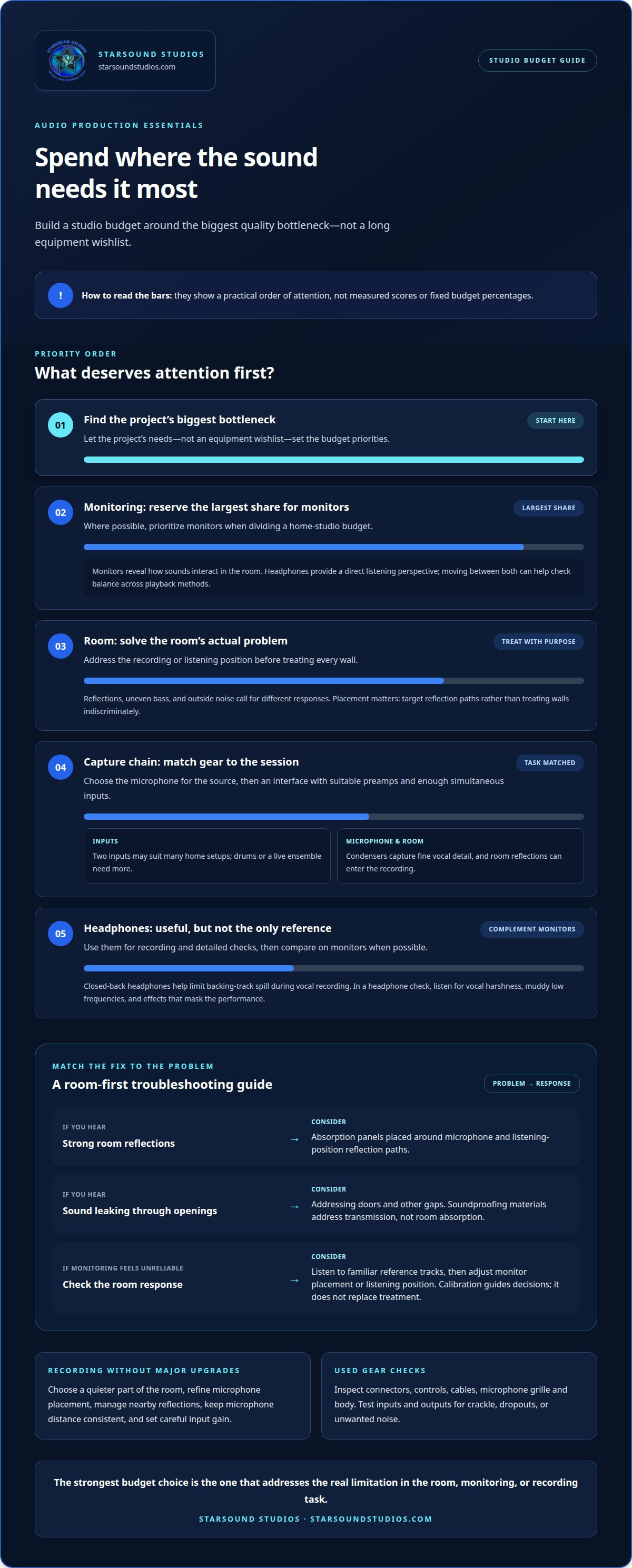
Where possible, prioritize monitors when allocating the largest share of a home studio budget.
How professionals approach acoustic treatment and room calibration on a budget
First identify the room’s strongest problems, such as audible reflections, uneven bass, or outside noise. Treat the recording or listening position before covering every wall. The right approach depends on how the room affects the sound.
Absorption panels reduce reflections around a microphone and listening position. These options differ in cost and finish, but placement matters: professionals target reflection paths instead of treating walls indiscriminately.
Room calibration helps engineers understand how monitors translate in their specific space. Listen to familiar reference tracks, check the room’s response, and adjust monitor placement or listening position where needed. Calibration can guide decisions, but it doesn’t replace acoustic treatment. A room that strongly colors bass or reflections can still mislead mixing choices, even with measurement tools.
Soundproofing materials address sound transmission and gaps, rather than replacing absorption panels. Choose based on the problem: use absorption to reduce room reflections, or address doors and other openings to limit leakage.
To improve recordings without expensive equipment, refine microphone placement, choose a quieter part of the room, and manage nearby reflections. Moving a vocalist away from a reflective wall, for example, can change the recorded tone before you use a plugin. Consistent microphone distance and careful input gain also help preserve a clean, controlled performance.
How professionals allocate a budget for audio production studio essentials
Build a budget around the project’s biggest quality bottleneck, not a long equipment wishlist. For professional audio production on a budget, use equipment needs as a starting point, then account for what the sessions actually require.
Set aside the largest share for monitoring when possible, since it guides decisions across recording and mixing. Then weigh the room, computer, and recording chain together. A computer with at least 8 GB of RAM is recommended for music production. If it struggles with a project, adding plugins or instruments won’t solve the workflow problem.
Hidden costs can include cables, microphone stands, storage, software, and room improvements. These needs vary by project, so account for them before committing the full budget to headline gear. Missing accessories or insufficient storage can interrupt a session even when the main equipment is ready.
- For a first setup: prioritize a working recording chain and essential accessories before expanding the gear list.
- For a solid budget: balance monitoring, computer capacity, and room needs instead of overspending on one component.
- For a larger setup: add equipment only when the workflow calls for it, such as recording multiple sources at once.
Approaching professional audio production on a budget means comparing options by usefulness, not sticker price alone. Equipment earns its place when it solves a recurring production need, works with the rest of the system, and supports the project’s sound. Address the biggest limitation first, then reassess before making further upgrades.
For guidance on making confident production decisions, build your audio engineering skills through practical instruction.
Starsound Studios: Audio Engineering Classes
If you want to strengthen your production decisions or bring a project to a professional finish, Starsound Studios offers Audio Engineering Classes alongside recording, mixing, and mastering in North Royalton, Cleveland, Ohio. The classes help you build a deeper understanding of recording and mixing choices that shape a polished sound.
If you’re ready for expert support, Starsound Studios also offers Stereo Mixing, Mastering, and Dolby Atmos Mixing (9.1.4). Choose the path that fits your project: develop your skills through classes, or hand over tracks for professional mixing or mastering. Each approach keeps the creative intent at the center while bringing technical care to the result.
Contact Starsound Studios to discuss your audio project or learning goals.
Give your next project a clear direction
The next step isn’t necessarily another purchase. Before adding gear, define what you want the finished track to communicate and where your current process gets in the way. That focus helps you decide whether to develop your own skills or bring experienced ears to a project that needs a polished, release-ready sound.
Professional audio production on a budget is ultimately about making considered choices that serve the music. A thoughtful production plan keeps technical decisions connected to the performance instead of making equipment the center of the process. When you’re ready to move a track forward, contact Starsound Studios in North Royalton, Cleveland, Ohio, to discuss recording, mixing, mastering, or audio education.
Contact Starsound Studios to discuss the right next step for your project. Keep creating with intention, and let the sound grow with your vision.
Frequently Asked Questions
What is the minimum budget for professional audio production in a home studio?
Treat this as a starting gear budget, not a fee for professional recording, mixing, or mastering. Your actual setup depends on what you already own, the project’s recording needs, and whether your computer can handle the work. Prioritize a complete, usable signal chain over isolated upgrades.
How can a professional improve room acoustics cheaply for recording and mixing?
Start by choosing a recording position that avoids obvious reflections and background noise. For a vocal take, test a few microphone positions and listen for room coloration before adding equipment. Then target specific reflection paths near the performer or listening position. This focused approach helps avoid spending on treatment that doesn’t address the room’s main acoustic problem.
How do budget studio monitors compare with mixing headphones in professional audio production?
Budget studio monitors reveal how speakers interact with the room, while headphones provide direct listening without the same room playback. A mix, for example, may seem bass-heavy on headphones but translate differently through monitors. Compare vocal balance, low end, and effects across both, then use familiar reference tracks to spot differences before finalizing decisions.
Which free or low-cost DAWs and audio plugins are best for professional-sounding production?
Audacity, GarageBand, and REAPER are free or low-cost DAWs that can support polished production when paired with stock EQ and compression plugins.


