

What if the kick didn’t need to hit harder, but simply needed more room? In dense electronic arrangements, kick and bass can mask each other. Sidechain compression in electronic music is a practical way to create space while adding rhythmic movement. Push it too far, though, and a satisfying pulse can become distracting pumping.
If compressor controls or sidechain routing have felt confusing, you’re not alone. A preset can get you started, but understanding what triggers the compressor, how the settings shape its response, and when to ease off gives you far more control over the groove.
This guide walks through the process step by step. You’ll learn how the sidechain signal controls another sound, how to route and adjust a compressor, and how to choose between subtle ducking and a more pronounced effect. Then you can listen for what the track needs instead of chasing a one-size-fits-all setting. The goal is movement with purpose, and a mix where the kick and bass work together.
Key Takeaways
- Learn how sidechain compression in electronic music can make room for competing sounds while shaping the track’s rhythmic feel.
- Understand how the trigger signal and compressor controls influence the movement you hear.
- Compare sidechain approaches by their musical purpose, including the trade-offs each can bring to your mix.
- Follow a repeatable DAW setup process that starts with a listening goal, not a preset.
- Use a final listening checklist to decide whether the effect supports the groove or calls too much attention to itself.
What Sidechain Compression in Electronic Music Does for Your Mix
A kick and bass can occupy the same low-frequency space, making both feel less defined. A sustained synth can also blur the attack of a kick, snare, or pluck that needs to cut through. Sidechain compression manages that overlap over time: one signal tells a compressor when and how much to reduce the level of another.
The goal isn’t automatically to make the mix pump. A small, quick reduction can help a transient speak without drawing attention to the processing. A deeper, more rhythmic dip can become part of the track’s identity. Choose based on what you want the listener to hear.
What does a sidechain signal actually control?
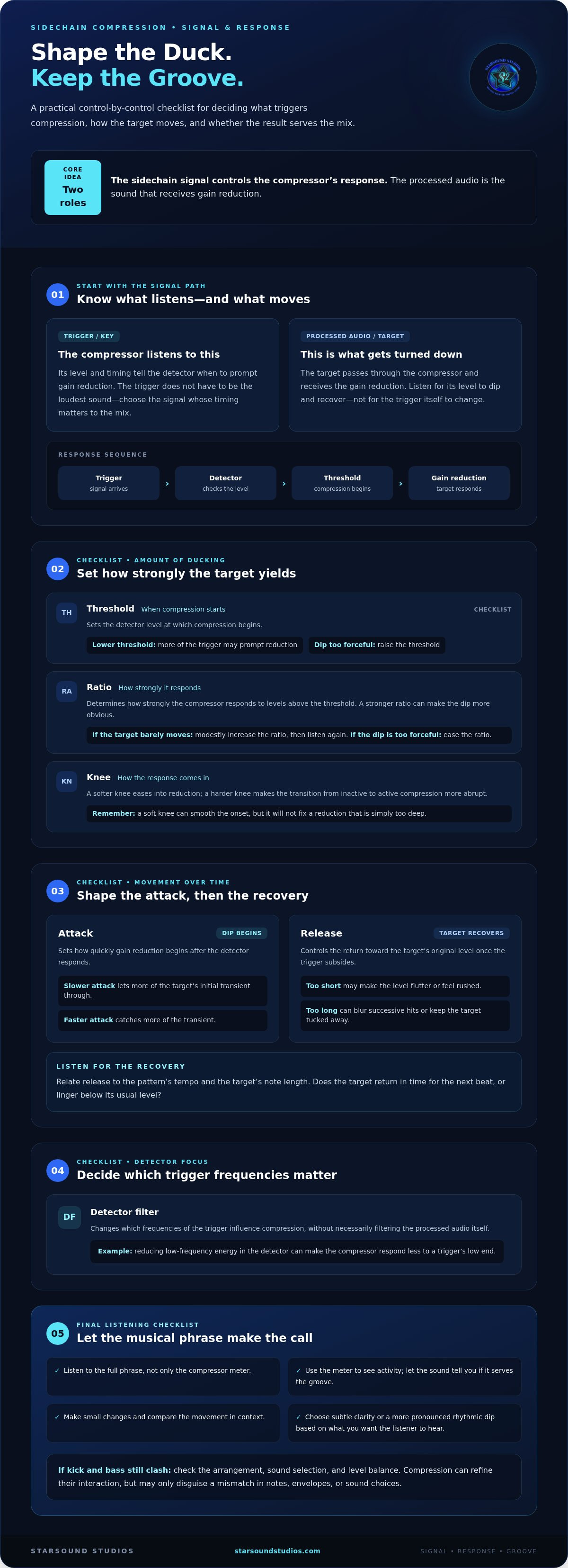
Think of two separate roles. The processed audio is the sound passing through the compressor and receiving gain reduction. The sidechain signal, also called the trigger or key, is what the compressor listens to when deciding whether to reduce that sound. In short: the sidechain input controls the compressor’s response; the target audio is what gets turned down.
For example, route the kick to trigger compression on the bass. The kick remains audible, while the bass dips whenever the compressor detects the kick’s signal crossing its threshold. Other pairings can be useful, too: a vocal can trigger a small reduction in a synth or pad to help the words stay clear, or a snare can trigger a change in a sustained layer. The trigger doesn’t have to be the loudest sound. It should be the signal whose timing matters to the mix.
This uses the same core principle as dynamic range compression, where a compressor changes a signal’s level in response to its detected level. Sidechain routing changes which signal drives that response, giving you more control over how sounds interact.
Why sidechain compression became part of electronic music
Electronic music often builds energy from repeating kick patterns, basslines, and sustained synth parts. When several sounds arrive or sustain at the same time, the mix can feel crowded. Letting one sound briefly yield to another can clarify its transient and create motion between hits. Kick-triggered bass ducking is a familiar example, but it’s a creative option, not a requirement for every track.
Make the dip pronounced and you’ll hear the level fall and recover with the beat. That pumping can act like a groove in its own right, especially when the recovery shapes the space between kick hits. Keep it subtle and the effect may register only as cleaner low end or a more defined attack. Neither approach is inherently better. Listen for whether the movement supports the arrangement or competes with it.
Processing has limits. If the bass and kick clash because their notes, envelopes, or sound choices don’t work together, compression may only disguise the problem. Start with the arrangement, sound selection, and level balance. Then use sidechain compression in electronic music to refine the interaction and create the feel you want.
How a Sidechain Compressor Responds to the Trigger
A sidechain compressor follows a chain of decisions. It listens to the trigger through a detector, checks the signal level against the threshold, and calculates how much gain reduction to apply to the processed audio. Attack and release shape when that reduction begins and ends. You hear the result as a change in the target sound’s level, not necessarily as a change to the trigger itself.
The signal path works the same whether a kick triggers a bass dip or a vocal prompts a synth to move back. When you tune sidechain compression in electronic music, watch the gain-reduction meter if your compressor has one, but let the sound guide the decision. The meter shows activity. It can’t tell you whether the movement serves the groove.
Threshold, ratio, and knee: how much the signal ducks
The threshold sets the detector level at which compression begins. Lower it and more of the trigger’s signal may prompt gain reduction. The ratio determines how strongly the compressor responds to levels above that threshold. A stronger ratio can produce a more obvious dip, but there’s no single value that suits every source or musical intention. The knee controls how sharply compression transitions from inactive to active: a softer knee eases into reduction, while a harder knee makes the change more abrupt.
Adjust these controls while listening to the full musical phrase. If the target barely moves when the trigger hits, lower the threshold or increase the ratio modestly, then compare again. If the dip feels too forceful, ease the ratio or raise the threshold. A soft knee can smooth the onset of compression, but it won’t fix a reduction that’s simply too deep.
Attack, release, and sidechain filtering: shaping the movement
Attack determines how quickly gain reduction begins after the detector responds. A slower attack lets more of the target’s initial transient through; a faster attack catches more of it. Release controls the return toward the target’s original level once the trigger subsides. In practice, release time determines how quickly the target recovers after the trigger and whether it returns in time for the next beat or lingers below its usual level.
Listen in context and relate recovery to the pattern’s tempo and the target’s note length. A release that’s too short may make the level flutter or feel rushed; one that’s too long can blur successive hits or keep the target tucked away. Make small changes and compare the groove, not just the compressor’s meter.
A detector filter changes which frequencies of the trigger influence compression, without necessarily filtering the processed audio itself. For example, reducing low-frequency energy in the detector can make a compressor respond less to a kick’s sub-heavy body and more to its higher-frequency attack. This can refine triggering, but it won’t prevent every unwanted response. Listen for false or inconsistent gain reduction and adjust the filter by ear.
If compressor behavior is hard to judge, a second perspective can help connect the settings to the musical balance. Starsound Studios provides professional stereo mixing from its studio in North Royalton, Ohio, serving artists in the Cleveland area and remote clients worldwide. Learn about professional stereo mixing.
Which Sidechain Method Fits Your Electronic Music Goal?
The best sidechain method depends on what you want the listener to notice. A gentle dip can clarify a mix without announcing itself; a deep, regular swell can become a defining production texture. Choose the trigger and process around the musical purpose, then judge the result in the full arrangement.
Kick-triggered, ghost-triggered, and filtered sidechain signals
Use the audible kick as the trigger when you want the bass or another layer to respond to the kick’s actual timing and dynamics. A ghost trigger is a separate rhythmic signal that drives compression without being heard in the mix. It’s useful when the audible kick’s pattern, envelope, or level doesn’t create the movement you want. Filtering the compressor’s detector can also reduce its response to unwanted frequencies in the trigger, though it won’t remove every cause of uneven gain reduction.
| Trigger source | Best-fit use | Main listening trade-off |
|---|---|---|
| Audible kick | Natural bass ducking that follows the kick performance | Kick changes can make the bass response less uniform |
| Ghost trigger | Consistent or custom rhythmic movement | The duck may no longer follow the audible kick exactly |
| Filtered trigger | Reducing sensitivity to distracting frequencies in a trigger | Filtering can change when or how strongly compression responds |
These choices can serve different goals in the same session. For example, let the audible kick guide a restrained low-end dip, then use a separate rhythmic trigger on a pad if you want a more regular pulse. Keep the distinction clear: filtering the detector changes what the compressor hears, while multiband processing changes which parts of the target signal are compressed.
Compressor ducking or volume shaping?
Compressor-based sidechaining reacts to the trigger’s level. That response can feel connected to the performance: a stronger trigger may produce more gain reduction, depending on the settings. It’s a practical choice when you want the target to move in relation to an actual sound, with attack, release, and other controls shaping the response.
Volume shaping uses automation or a drawn volume curve to set the level movement directly. It can produce a highly repeatable contour, even when no trigger signal is present, but it won’t automatically follow changes in the kick. Use it when precise, consistent pumping matters more than a level response tied to the trigger.
For a natural result, try restrained compression driven by the audible source. For tightly controlled repetition, consider a ghost trigger or a fixed volume curve. For an exaggerated effect, deepen the movement deliberately, then check that it reinforces the track rather than pulling focus from its other parts. Sidechain compression in electronic music is most effective when the method reflects the groove you’re building, not a preset you’re trying to match.
How to Set Up Sidechain Compression in a DAW
A reliable setup begins before you open the compressor. Decide what you want to hear: a little more space for the kick, a clearer vocal, or an audible rhythmic swell. Then prepare the session so you can judge the change in context. Make sure the relevant tracks are playing, levels are sensible, and the section you’re adjusting includes the groove you want to shape. Understanding signal flow in audio can also make the routing easier to follow.
- Choose the source and destination. Pick the track whose timing should guide the movement, such as a kick, then identify the track you want the compressor to affect, such as a bass part. Establish the musical relationship before you route anything.
- Place a compressor on the destination. Add the compressor to the track that should change in level. Find its external sidechain or key-input option. DAWs and plugins use different labels, but you’re looking for a way to feed the compressor a signal from another track.
- Send the trigger to the compressor. Use the DAW’s routing controls to send the chosen source to the compressor’s sidechain input. This send may be separate from the source’s audible output. Check that you haven’t accidentally routed the trigger directly into the destination’s audio path.
- Confirm the trigger is driving the response. Play the section and watch the compressor’s gain-reduction meter, if available. Mute the trigger briefly or stop its playback: the response should change. If compression continues as before, check the selected input, send level, and sidechain mode.
- Start conservatively and adjust one control at a time. Begin with restrained gain reduction. Adjust the threshold until the effect addresses your listening goal, then shape the attack and release while the relevant parts play together. Changing one control at a time makes cause and effect easier to hear.
- Compare in the full arrangement. Bypass the compressor briefly, then re-enable it at a matched playback level. Listen for improved separation and a groove that still feels natural. A louder version can seem better simply because it’s louder, so level matching keeps the comparison useful.
Don’t tune the effect in solo and assume it will work in the mix. Solo can help you confirm that the compressor reacts, but the kick, bass, and surrounding arrangement reveal whether the movement feels right. If the mix loses weight, ease the reduction. If the kick still feels masked, revisit the routing and settings before adding more processing.
Setting up sidechain compression in electronic music is part routing, part listening. For artists in Cleveland and beyond, Starsound Studios offers professional stereo mixing to help bring the elements together. Explore stereo mixing services.
Refine the Pumping and Decide When the Mix Is Ready
Once the compressor responds as intended, the final decision is musical: does the movement help the track communicate? A useful sidechain effect may be almost invisible, making room for a kick or protecting a transient without calling attention to itself. Or it may be deliberately pronounced, turning the rise and fall of a synth or bass into a hook. Both can work. Maximum loudness or the deepest gain reduction isn’t proof of a better mix.
Spot the signs that sidechain compression is doing too much
Listen beyond the loudest drop. A bass line may lose the shape of its notes if it ducks too far, while an overly fast or forceful response can soften the kick’s attack instead of giving it space. If the kick and bass seem disconnected from the groove, the compressor may be pulling the target down for too long or too abruptly.
Check quieter sections, fills, and transitions as well. Repeated gain reduction that feels exciting in a dense chorus can become distracting when fewer parts are playing. Bypass the processor, then compare the processed and unprocessed versions at similar perceived loudness. Ask what actually improved: clearer transients, better separation, a stronger pulse, or simply a change in level?
- Clarity: Can you follow the kick and bass without one obscuring the other?
- Groove: Does the recovery between hits feel connected to the rhythm, rather than rushed or sluggish?
- Transient impact: Do the important attacks still have definition and weight?
- Artifacts: Do you hear distracting flutter, abrupt level shifts, or bass notes that seem to disappear?
If a problem appears, adjust one element at a time. Reduce the depth of the gain reduction, reshape the attack or release, or revisit the trigger. Then listen to the full phrase again. The goal isn’t to eliminate every trace of movement; it’s to make sure the movement earns its place.
Turn a technical effect into a musical decision
Ask what the processing contributes. Does it create room for a sound that matters? Does it reinforce the rhythm? Or is the pumping itself a deliberate production signature? Your answer can change from section to section. A dense drop may benefit from more pronounced movement, while a sparse breakdown may call for a lighter touch so sustained parts can breathe.
Save a version you like and revisit it after a short break. A fresh listen can reveal whether the effect still supports the arrangement beyond the moment you’ve spent adjusting controls. If you want another perspective on the finished balance, Starsound Studios provides stereo mixing for artists in the Cleveland area and remote clients worldwide. Work with Starsound Studios on stereo mixing.
Shape a Mix That Moves With Purpose
Your next session is a chance to make every movement intentional. Treat sidechain compression in electronic music as a creative decision, not a setting to apply by default. Build a version that serves the groove, then trust your ears to decide whether the effect should disappear into the balance or take a more expressive role.
Starsound Studios is a professional recording facility in North Royalton, Ohio, serving artists in the Cleveland area and providing remote mixing worldwide. Its stereo mixing service can help you assess how the kick, bass, and other elements work together in the finished track.
Explore professional stereo mixing with Starsound Studios and take the next step toward a mix that feels unmistakably yours. Keep experimenting, stay guided by the music, and let the track’s character lead the way.
Frequently Asked Questions
Is sidechain compression necessary in every electronic music track?
No. It’s an optional tool, not a required step in sidechain compression in electronic music. If a sparse verse already gives the kick and bass room, adding compression may create movement you don’t need. Try bypassing the effect in different sections: a setting that helps a dense chorus might feel distracting in an intro. Keep it only where it improves the sound or adds a deliberate musical character.
Can sidechain compression make a mix sound quieter?
Yes. While the trigger is active, compression lowers the processed track, which can make that part seem quieter or less present. The change may also affect the perceived energy of a group of instruments. Before compensating with more level, listen for whether the kick or another important part has become clearer. Compare the processed and bypassed versions at similar playback levels, and check that added gain doesn’t simply restore the masking you were trying to solve.
What is the difference between sidechain compression and ducking?
Ducking is the audible effect of one sound becoming quieter in response to another; sidechain compression is one way to produce it. For example, you can use a vocal to trigger compression on a synth. Volume automation can create a similar dip, but it follows a programmed curve rather than reacting to the trigger’s changing level. The terms are related, but “ducking” describes the result more broadly than a particular processing method.
Can I sidechain vocals to synths in an electronic track?
Yes. A vocal can trigger a modest reduction in a synth or pad, helping words stay intelligible through a dense phrase. Use a vocal passage with clear consonants as your test, then listen to both the start and end of the phrase. If the synth seems to wobble between syllables or loses too much sustain, reduce the effect or make its response gentler. Judge the change with the full arrangement playing.
Does sidechain compression work when mixing on headphones?
Yes, you can set up and fine-tune sidechain compression on headphones. Low-end balance can feel different across headphones, so avoid increasing the effect just because the bass movement seems understated. Use a familiar reference track at a comfortable listening level, then check your mix on speakers or another playback system when possible. Pay attention to whether the bass feels continuous and the kick remains defined, not just to how dramatic the pumping sounds in your headphones.
Can sidechain compression still be heard after mastering?
Yes. Mastering won’t automatically remove level movement already built into the mix, and processing during mastering can change how prominent that movement feels. Make your sidechain choices in the mix, then review the mastered version for shifts in bass balance or groove. Starsound Studios provides mastering from its studio in North Royalton, Ohio, serving artists in the Cleveland area and beyond.


