
The DAW with the bigger studio reputation might not be the better choice for your next record. In the logic pro vs pro tools decision, what matters most is how each program supports the way you write, record, edit, and collaborate. Weigh industry expectations, session compatibility, and the time it takes to learn a new workflow, but start with the demands of your own projects rather than brand loyalty.
This comparison covers practical differences between Logic Pro and Pro Tools, including creative production, audio editing, recording workflows, platform needs, and sharing sessions with collaborators. You’ll see how to compare their workflows and test each one against a project you know. If you want to build confidence at the controls, Starsound Studios teaches both Logic Pro and Pro Tools in a professional studio environment in North Royalton, Ohio.
We’ll focus on the decisions that shape day-to-day sessions: the music you make, the computer you use, and the studios or people you work with. The goal is straightforward: choose the tool that keeps your creative process moving and supports the way you need to work.
Key Takeaways
- A DAW shapes how you create and organize a session, but it doesn’t determine the inherent quality of your recorded sound.
- Compare how each workflow handles MIDI, virtual instruments, audio recording, editing, and arrangement against the way you build a track.
- For logic pro vs pro tools, weigh operating-system support and collaboration needs alongside each program’s session workflow.
- Distinguish native project files from audio exports and session-exchange formats when planning a handoff between systems.
- Test a representative project in each DAW you can use. Practical instruction can help you build confidence in recording and production.
Logic Pro vs. Pro Tools: Why Workflow Matters
A digital audio workstation (DAW) is the software environment where you record, edit, arrange, and mix audio and MIDI. It holds the tracks, tools, routing, and editing decisions that carry an idea from its first take to a finished mix. Logic Pro and Pro Tools can both support detailed production work, but they organize that work differently. For background on how one of these platforms developed, explore Logic Pro's history and features.
That distinction matters because a DAW shapes how you work, not the inherent quality of the sound you record. The useful question in the logic pro vs pro tools comparison isn’t which program is universally superior. It’s which workflow suits your projects, your setup, and the people you need to work with.
What does a DAW choice change in everyday music production?
Software influences the small decisions you make repeatedly: creating tracks, finding takes, editing timing, organizing instruments, and moving between arrangement and mixing. An interface that makes those tasks clear can help a session stay focused. A different layout or editing approach may suit another producer better. Neither preference is automatically a professional requirement.
Separate personal comfort from practical constraints. Your operating system can determine which DAW is available to you, while collaboration may make a shared session workflow important. Before choosing, consider:
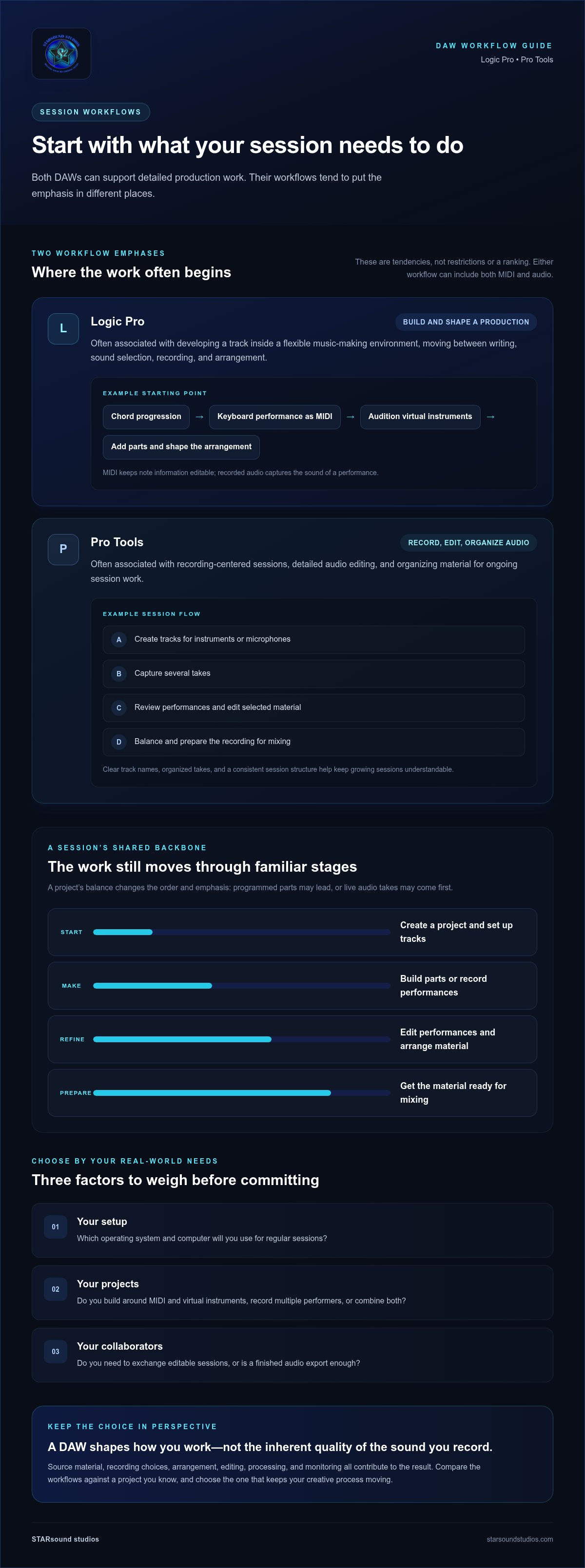
- Your setup: Which operating system and computer will you use for regular sessions?
- Your projects: Do you build songs around MIDI and virtual instruments, record multiple performers, or combine both?
- Your collaborators: Do you need to exchange editable sessions, or is a finished audio export enough?
For example, a solo producer sketching a track at home may prioritize an arrangement workflow that makes it easy to audition sounds and shape ideas. For a shared recording project, agreeing on track names, take organization, edits, and session handoffs may matter more, especially when another engineer needs to continue the work. Let the project determine which needs come first.
Does one DAW automatically sound more professional?
No. A polished result depends on decisions throughout production: the source material, recording choices, arrangement, editing, processing, and monitoring. A DAW provides tools for carrying out those decisions, but choosing Logic Pro or Pro Tools alone doesn’t guarantee a more professional sound. The performance and engineering still lead.
Workflow affects the creative process in a different way. If recording, editing, or arranging feels intuitive, you can spend less attention wrestling with routine tasks and more listening closely to the music. If the interface or session habits slow you down, that friction may interrupt momentum, even when the software can technically complete the task.
Think of the DAW as the workspace where your production takes shape. The best choice is the one that lets you work confidently while meeting the demands of your sessions. Compare those demands directly rather than relying on reputation or assuming one platform fits every artist.
Logic Pro vs. Pro Tools: Session Workflows
A session usually moves through a sequence: create a project, set up tracks, capture or build musical parts, edit performances, arrange the material, then prepare it for mixing. The balance between those steps depends on the project. A song built from programmed parts may begin with MIDI and virtual instruments, while a band recording may start with audio tracks and live takes. Both workflows can include both kinds of material. The difference is often which tasks shape the session first.
Logic Pro’s workflow emphasis is building and shaping a production inside a flexible music-making environment. Pro Tools’ workflow emphasis is recording, editing, and organizing audio for detailed session work. These are useful tendencies, not restrictions or a ranking. Capabilities can change between software releases, so consult Apple’s Official Logic Pro features for current information rather than relying on an old tutorial or a remembered interface.
How Logic Pro supports composition and production
Imagine starting with a chord progression. You might record a keyboard performance as MIDI, use a virtual instrument to audition different sounds, then add a drum part and a vocal or guitar recording. As the song takes shape, you can refine the arrangement by changing sections, layering parts, and editing performances. MIDI keeps note information editable, while recorded audio captures the sound of a performance.
This approach can suit someone who develops a track primarily inside the DAW, moving between writing, sound selection, recording, and arrangement as ideas evolve. Organization still matters: clear track names, sensible grouping, and labeled song sections make it easier to revisit a project or hand it off. Logic Pro is often associated with composition and production, but it can also support audio recording and editing. The fit depends on how you prefer to create, not on a fixed genre or job description.
How Pro Tools supports recording and audio editing
For a recording-centered session, an engineer might create tracks for each instrument or microphone, capture several takes, then review the performances and edit the selected material. Clear track names, organized takes, and a consistent session structure help keep the work understandable as the recording grows. After editing, the engineer can balance and route tracks as the session moves toward mix preparation. Exact controls and terminology may vary by version, so use current documentation when following detailed instructions.
This style can be especially relevant when recorded audio, editing precision, or studio collaboration is central to the project. Before a mix, tidy tracks and deliberate session organization make it easier to focus on balances, dynamics, and the musical relationship between parts. For a deeper look at that next stage, see this professional mixing and mastering guide.
To feel the difference, build the same short musical idea in each DAW: record or program a few parts, arrange a complete section, edit one performance, and prepare the tracks for mixing. Notice where you move naturally and where routine tasks slow you down. Starsound Studios teaches both workflows in its audio engineering classes. Explore audio engineering classes at Starsound Studios.
Logic Pro vs. Pro Tools: Collaboration & Compatibility
Collaboration depends on more than which DAW an engineer prefers. Your operating system, the kind of project you share, and the handoff expected at each stage all matter. In the logic pro vs pro tools comparison, distinguish working in the same native project from exchanging audio that another person can import into a different DAW.
| Consideration | Logic Pro | Pro Tools |
|---|---|---|
| Operating systems | Available for Apple platforms, including macOS and iPadOS. | Available for macOS and Windows. |
| Native project workflow | Projects are designed to be opened and worked on in Logic Pro. | Projects are designed to be opened and worked on in Pro Tools. |
| Cross-DAW handoff | Audio exports, stems, or supported session-exchange formats can help transfer work, but they may not preserve every edit, instrument, plug-in, or routing choice. | |
| Best collaboration check | Agree in advance on software, deliverables, file settings, and how the next engineer will continue the session. | |
Can Logic Pro and Pro Tools sessions move between systems?
Not as fully editable native projects by default. A Logic Pro project doesn’t automatically become a Pro Tools session, or vice versa. A handoff may instead use consolidated audio files or stems, which let the receiving engineer import and mix the parts. A session-exchange format may carry more session structure, but what transfers depends on format support, software versions, and project contents. Instruments and plug-ins may need to be recreated or rendered to audio.
Before sending a multitrack recording, agree on track names, export start and end points, file format, sample rate, and bit depth. Include a reference mix and concise session notes describing the tempo, arrangement changes, and any tracks that need special attention. Confirm the recipient can use the chosen handoff before exporting. A clear plan helps prevent missing parts and avoidable reconstruction.
What should you compare before collaborating with other engineers?
Start with the recipient’s DAW and operating system, then clarify whether they need the editable session or only audio files. Align on deliverables, naming conventions, file settings, and who is responsible for relinking or rebuilding elements after transfer. Pro Tools has a long history in professional audio workflows; this Pro Tools overview and history offers broader context, but reputation alone won’t solve a handoff. An engineer’s role also includes communication and preparing material for the next stage, as explored in this audio engineering craft and career guide.
These details affect efficiency, not inherent sound quality or professional credibility. Starsound Studios’ audio engineering classes teach both DAWs, with practical training in a studio setting. Explore hands-on audio engineering classes to build familiarity with either workflow.
Choosing Logic Pro or Pro Tools for Your Project
Choose based on the needs that recur across your projects, not a single feature or a DAW’s reputation. Start with four practical questions: What do you make most often? Which operating system and computer will you use? Who needs to open or continue your sessions? And how comfortable are you with each workflow already?
Then test the options instead of deciding from screenshots or feature lists. Use a familiar project and take it through a small but complete cycle: create the session, record or program a few parts, edit them, arrange a section, and prepare files for the next step. Pay attention to task flow, organization, and compatibility. Confirm current software and operating-system requirements before committing, since support can change with updates.
Which DAW may fit a producer building songs inside the software?
If most of your process happens in the box, consider how often you write with MIDI and virtual instruments, revise parts, and arrange a song as it develops. Logic Pro may suit producers who want to compose and shape much of a track in one music-making environment, provided its Apple-platform requirements fit their setup. Pro Tools may also work for this style. The better fit depends on your habits and comfort, not a rule about what either DAW can do.
Use a project you know well. Rebuild a verse or chorus, not just a short demo, so you can judge how naturally you move between writing, editing, and arranging. A familiar musical goal gives you a fairer comparison than an unfamiliar tutorial exercise.
Which DAW may fit recording-heavy or shared engineering work?
For sessions centered on live recording, assess how you handle multiple takes, detailed edits, track organization, and mix preparation. Pro Tools supports macOS and Windows, while Logic Pro is designed for Apple platforms, so your computer can narrow the options before workflow preference comes into play. If you regularly share work, the team’s established session habits and expected deliverables may be the deciding factor.
In Cleveland-area studio work, collaborators may bring different software and handoff routines. Agree on file delivery and session expectations early rather than assuming every local engineer uses the same DAW. Test how well your preferred workflow supports the collaborations you actually anticipate.
Save this checklist for your comparison:
- Does the DAW support my current computer and operating system?
- Does its workflow suit my typical balance of MIDI, instruments, and recorded audio?
- Can I exchange the sessions or deliverables my collaborators need?
- Can I complete a representative project without routine tasks disrupting my focus?
- Have I checked current software requirements and licensing before settling in?
The logic pro vs pro tools decision becomes clearer when you test real work and prioritize the needs that repeat. Starsound Studios teaches both DAWs in a professional studio environment in North Royalton, serving artists in Greater Cleveland. Explore audio engineering classes to develop your workflow with practical instruction.
Learn Logic Pro or Pro Tools at Starsound Studios
Choosing between Logic Pro and Pro Tools is easier when you’ve worked through real sessions in both environments. Starsound Studios’ audio engineering classes teach both DAWs in a professional recording facility in North Royalton, Ohio. The aim isn’t to favor one program. It’s to build skills you can apply to the projects and workflows that matter to you.
Practice can turn abstract interface choices into useful working knowledge. Instead of only watching someone else edit a track, consider why a session is organized a certain way, how a recording decision affects the next step, and what to prepare before mixing. These fundamentals can serve you whether you’re developing your own productions or preparing to collaborate.
What can hands-on DAW instruction help you practise?
Work on the building blocks of a dependable session: setup, track organization, editing, and the workflow decisions that keep a project clear as it grows. Explore how MIDI and recorded audio fit into a session, how to manage edits, and how to prepare material for later stages. The value is broader than memorizing commands. You’re learning to make intentional engineering choices.
Those skills transfer. Clear session structure and thoughtful editing habits can help you work with different projects and collaborators, even as software evolves. DAW practice also connects directly to shaping a finished mix. For an overview of how mixing and mastering contribute to the final result, read this professional mixing and mastering guide.
How does a professional studio setting connect software to sound?
In a recording facility, DAW decisions sit alongside the sound being captured and the work required to refine it. Track choices, edits, and session organization become easier to understand when you can relate them to a recording and its eventual mix. That context helps bridge the gap between operating software and listening critically, so technical steps support the music rather than distract from it.
Starsound Studios is based in North Royalton, Ohio, serving Greater Cleveland and remote clients. Its studio environment connects DAW concepts to recording, editing, and production. Whether you’re new to a workstation or strengthening skills you already use, focused instruction can help you develop a more confident process.
To build practical skills in Logic Pro or Pro Tools, explore audio engineering classes at Starsound Studios. Bring your curiosity and the kind of music you want to create. The right workflow is one you understand well enough to make your ideas move.
Let Your Next Session Shape the Choice
Your DAW choice doesn’t have to define your creative identity. Treat it as part of a working practice: notice which tools help you stay present with the music, and which habits make sessions easier to revisit, refine, and share. As your projects grow, your needs may shift too. Clean editing, thoughtful organization, and attentive listening will travel with you.
The value of the logic pro vs pro tools decision is finding a place to begin with confidence, then building a process that serves the work in front of you. Choose a direction, make something, and let what you learn guide the next session. There’s room to keep exploring.
Ready to strengthen your technical instincts and creative workflow? Build your DAW skills through audio engineering classes at Starsound Studios.
Frequently Asked Questions
Can you open a Logic Pro project directly in Pro Tools?
Not usually as an editable native session. Logic Pro and Pro Tools use distinct project files, so a handoff typically requires exporting audio stems or using a session-exchange workflow supported by both software versions. Before transferring, agree on timing, track layout, and deliverables. Virtual instruments, plug-ins, automation, and detailed edits may not carry over identically, so preserve a backup and verify the transfer method for that project.
Is Logic Pro available for Windows?
No. Logic Pro is an Apple-platform application, available for macOS and iPadOS rather than Windows. That matters if you work with a Windows-based studio or producer, since they generally can’t open your native Logic project on their computer. Plan a handoff using agreed audio exports or a verified session-exchange workflow, and check current operating-system support and format limitations before sharing important work.
Can Pro Tools and Logic Pro be used in the same music project?
Yes. A project can move between both DAWs through a deliberate audio handoff, even though their native sessions remain separate. For example, export clearly named stems that start at the same point, and include the tempo, sample rate, and concise notes about edits or arrangement changes. Confirm the expected file settings and compatibility for the exact software versions before relying on an interchange option.
Is Logic Pro suitable for recording vocals and instruments?
Yes. Logic Pro can be used to record audio as well as compose and arrange music. Whether it suits your vocal or instrument sessions depends on your recording setup, interface comfort, editing habits, and how you share work with collaborators. A DAW doesn’t replace good recording technique: microphone placement, performance, room sound, and gain staging still shape the material you capture. Check current software requirements when planning a session.
Do I need to learn both Logic Pro and Pro Tools?
No. You can make strong music while learning one DAW well. Becoming fluent in a single workflow can help you focus on recording and production rather than switching tools before you need to. Learning the second may be useful when a project, collaborator, or career direction calls for it. For Cleveland-area artists, Starsound Studios’ audio engineering classes teach both programs, providing a practical way to build skills in either.
Can I switch from Logic Pro to Pro Tools later?
Yes, you can switch, but expect to learn a different workflow and plan how to carry existing work forward. Keep organized audio exports, track labels, tempo information, session notes, and backups so you can rebuild what a new project file doesn’t preserve. Before moving a live project, verify the handoff method for the specific software versions and check whether plug-ins, automation, and edits need to be recreated. The logic pro vs pro tools decision isn’t permanent. To practise either workflow with instruction in the Cleveland area, explore audio engineering classes at Starsound Studios.


