

What if the best mastering choice for your track has less to do with analog or digital and more to do with the sound you want? Claims about warmth and precision can make the analog vs digital mastering pros and cons seem like a contest, but neither format guarantees a better master. The right tools serve the music.
It’s reasonable to wonder whether analog hardware will add something meaningful to your mix, or whether a digital workflow can deliver the detail and control your track needs. Mastering is the final creative and technical check: shaping the finished mix and helping it translate across playback systems, from earbuds to club speakers.
This guide explains what analog and digital mean in practice, where each approach can help, and what trade-offs to consider. You’ll learn how to match processing to your music and what details to share when arranging professional mastering, so decisions stay focused on your intent rather than gear loyalty.
Key Takeaways
- Analog and digital describe different processing paths, not guaranteed levels of quality. The best choice depends on your musical intent.
- Understand where hardware, software, and conversion can enter the journey from stereo mix to finished master.
- Compare the analog vs digital mastering pros and cons through sound shaping, workflow, recall, and project needs.
- Start with what your mix should change or preserve to choose an analog, digital, or hybrid approach with purpose.
- Starsound Studios offers mastering for artists in Greater Cleveland and remote clients worldwide.
Analog vs. Digital Mastering: What the Two Approaches Actually Mean
Format debates can make mastering sound like a choice between artistic warmth and clinical precision. That framing obscures the more useful question: what does your music need, and which tools can help achieve it? In the analog vs digital mastering pros and cons discussion, “analog” and “digital” describe how audio is processed, not automatic rankings of quality. A thoughtful engineer can make musical, reliable decisions in either workflow.
In short: analog mastering processes audio through analog hardware; digital mastering processes it with digital tools; hybrid mastering combines both in one workflow. The finished master can still be a digital file even when analog equipment shaped the sound along the way. For broader context on mastering’s history and technology, see Audio Mastering: Analog vs. Digital.
What counts as an analog mastering signal path?
Analog mastering means that some part of the audio signal passes through physical analog equipment during processing. Depending on the engineer’s choices, this might include hardware for equalization, dynamics control, or other tone shaping. The defining feature is the signal path through analog circuitry, not the appearance of the equipment or a particular sonic result.
In a common setup, a digital mix is converted to an analog signal before entering hardware, then converted back to digital if the engineer continues processing or exports a digital master. Those conversion stages are part of the route, but they don’t determine whether the final delivery is analog or digital. The equipment, settings, and mastering decisions all affect the result. Analog hardware may add coloration, but it doesn’t guarantee warmth, depth, or improvement. Those outcomes depend on how the gear is used and whether it suits the mix.
What counts as digital or hybrid mastering?
Digital mastering uses tools that process audio in a digital workflow, commonly through software inside a digital audio workstation. An engineer can use these tools to adjust tonal balance, control dynamics, manage levels, and prepare the file for delivery. “In the box” is a familiar term for working entirely within that software environment. Digital processing is not synonymous with automated mastering: an engineer can make detailed, individual decisions using digital tools.
Hybrid mastering combines digital processing with analog hardware. For example, an engineer might make precise adjustments in software, route audio through a hardware equalizer for a chosen tonal effect, then return to digital tools for further processing and export. That’s one possible arrangement, not a standard chain. The order and amount of hardware use vary with the project and the engineer’s approach.
Think of the labels as a map of the tools, not a verdict on the destination. The useful test is whether a processing choice supports the track’s character, translates well, and preserves what you want listeners to hear.
How Analog and Digital Mastering Shape the Processing Workflow
A mastering workflow begins with the stereo mix and ends with a prepared master, but the route between those points depends on the engineer’s tools and the track’s needs. The signal path determines which processing stages occur and in what order. It might remain digital from start to finish, include analog hardware, or move between both domains.
First, the engineer brings the mix into the mastering session and listens for what the track needs. Digital tools may shape tonal balance, manage dynamics, adjust stereo image, or set final levels. Processing should follow the music, not a requirement to use every available tool. If the mix already has the character and balance you want, restrained processing may be the right choice.
After processing, the engineer reviews the result and prepares the deliverable in the requested format. The exact sequence varies. Some tasks happen early, others later, and a stage can be skipped if it doesn’t serve the track. That’s why the analog vs digital mastering pros and cons are easier to judge by understanding the actual workflow than by relying on broad claims about sound.
Where analog hardware enters the mastering chain
Analog hardware is an optional stage, not a requirement for professional quality. To use it, the engineer may convert the digital mix to an analog signal, route it through a device, then convert it back to digital for further work or delivery. Each device and setting can affect the result differently. Hardware doesn’t automatically add warmth or improve a mix. Its contribution depends on the equipment, how it’s set, and whether the choice fits the music.
For instance, an engineer might route a track through an analog equalizer to make a considered tonal adjustment, then return to software for final level control. That route adds a conversion step and a hardware stage, but neither should be treated as a benefit by default. Careful listening determines whether the change helps.
What digital processing changes in the workflow
Digital processing keeps the audio within a software-based environment. An engineer can adjust a parameter, compare versions, and save settings as part of the session. This makes revisions repeatable: a saved project can help recreate an earlier setup or refine a small detail without rebuilding the entire chain. Digital tools can offer precise control, though their effect still depends on the tool and how it’s used.
A practical workflow may also combine methods. The engineer could make detailed software adjustments, send audio through a hardware stage for a deliberate treatment, then finish in the digital session. Another project may stay entirely in software. Neither path is inherently transparent, colored, better, or worse in every application. The listening goal guides the choices.
- Mix: Start from the stereo file and identify what should change or stay intact.
- Process: Choose software, hardware, or both based on the intended result.
- Finish: Review the processed audio and prepare the final deliverable.
For professional stereo mastering, sharing your sonic priorities helps keep processing focused on the music.
Analog vs. Digital Mastering Pros and Cons: A Fair Comparison
The practical differences show up in processing choices and working methods, not in a guaranteed level of quality. Analog equipment can offer a particular response that an engineer may choose for a reason. Digital tools can support detailed adjustments and repeatable revisions. A useful comparison asks which approach serves the track’s character and the project’s needs.
| Consideration | Analog mastering | Digital mastering |
|---|---|---|
| Sound shaping | Selected hardware may contribute distinctive tonal or dynamic responses. The effect depends on the specific device, settings, and material. | Software offers a range of processing options and detailed parameter control. Results depend on the tools and how they’re used. |
| Workflow | May require routing audio through hardware, with conversion between digital and analog signal paths where relevant. | Can keep processing within a software session, which can make adjustments and comparisons straightforward. |
| Recall and revisions | Exact settings may take more effort to document or recreate, depending on the equipment and workflow. | Saved session settings can make it easier to revisit and repeat a particular setup. |
| Project fit | Worth considering when a hardware stage is deliberately chosen to support the intended sound. | Useful when detailed control or repeatable revisions are priorities, without implying a better sonic result. |
Potential advantages and trade-offs of analog mastering
An analog device may respond to audio in a way an engineer values for a particular mix. That makes hardware a potential creative choice, not a universal upgrade. There are practical considerations, too: routing may add steps, and recalling settings can be less immediate if they aren’t stored or documented in a session. Analog gear doesn’t automatically improve every mix or suit every genre. Its value depends on the result it achieves for the track.
Potential advantages and trade-offs of digital mastering
Digital tools can allow fine adjustments and saved settings, helping an engineer revisit a decision or make a focused revision. That convenience supports consistency, especially when a project needs changes, but it doesn’t determine whether the master sounds right. Software varies, and engineer judgment matters. A digital workflow can be creative and musical. Its flexibility is useful when the processing serves the material.
Project fit matters as much as processing preference. A track that needs a subtle tonal adjustment may not benefit from adding hardware just to claim an analog chain. A project requiring precise revisions may favor saved digital settings, while a considered hardware pass could still be appropriate if it supports the sound goal.
Neither format guarantees a better master; results depend on the decisions, tools, and execution. That’s the clearest takeaway from the analog vs digital mastering pros and cons: choose processing for what it does for the music, not for the label attached to it.
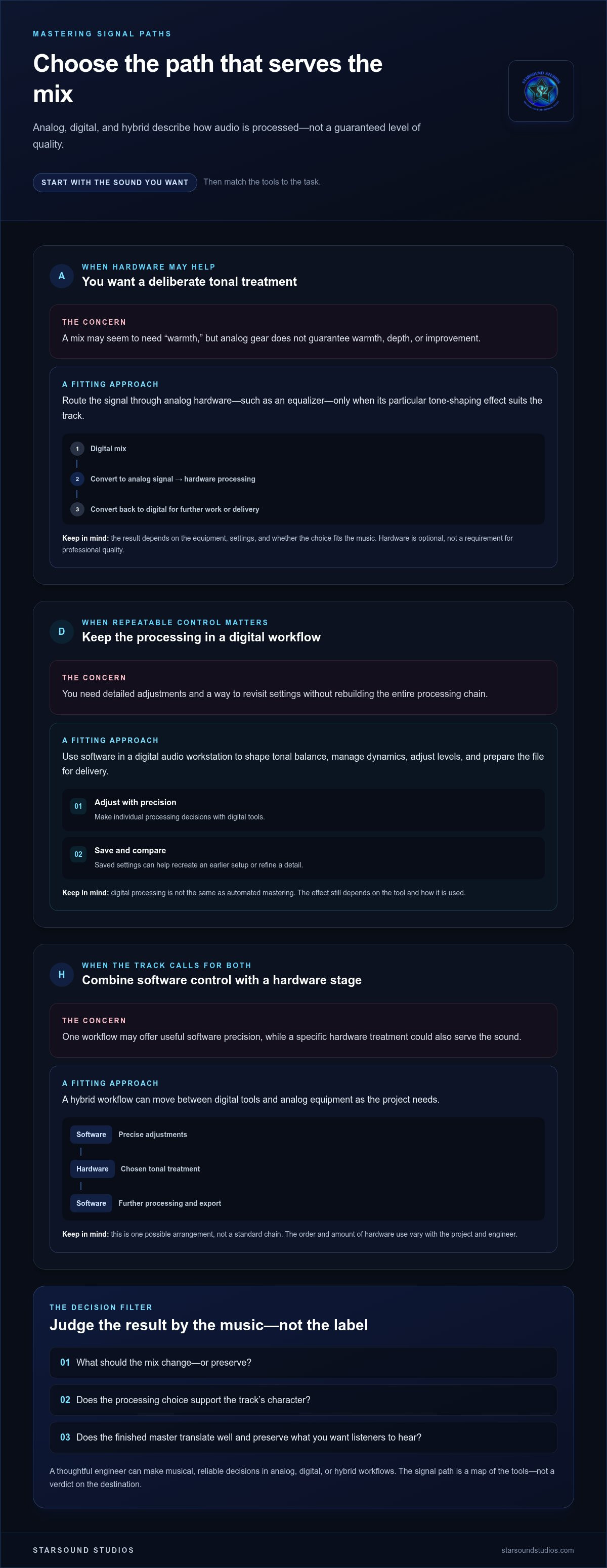
How to Choose Analog, Digital, or Hybrid Mastering for Your Track
Choose a workflow by starting with the sound you want, not the equipment label. Before weighing the analog vs digital mastering pros and cons, name what the mix needs and what should stay untouched. A clear goal gives the mastering process direction and makes comparisons more useful.
- Define the intended character. Decide whether the track needs subtle tonal shaping, dynamic control, consistency with other songs, or minimal intervention. Be specific about the listening experience. For example, “keep the vocal forward while preserving the punch of the drums” is more useful than simply requesting an analog sound.
- Identify what needs attention. Listen to the mix and note any recurring issue, such as a low end that feels uneven or a chorus that loses impact. Separate those concerns from qualities you value and want preserved. Mastering shouldn’t change the mix just to demonstrate that processing happened.
- Consider the project as a whole. If you’re preparing several tracks, consider their tonal and dynamic relationship as an album or collection. Think about revision expectations, too. A project likely to need repeated adjustments may benefit from a workflow that makes those changes easy to revisit.
- Clarify the deliverable. Tell the mastering engineer where the track will be released and what formats you need. Distribution requirements can shape export and quality-control decisions, even when they don’t dictate whether processing should be analog, digital, or hybrid.
- Compare the sound, not the label. If you’re evaluating processing options, use the same representative passage and playback setup. Listen at matched levels, since a louder version can seem more impressive even when it isn’t a better fit. Focus on tone, dynamics, clarity, and whether the music’s energy still feels right.
Match the workflow to the sound you want
References can help turn an instinct into useful direction. Share a track or passage that captures a quality you admire, then describe what matters: perhaps the vocal presence, bass definition, or sense of space. You’re communicating a listening goal, not prescribing a specific device. Genre can offer context, but it can’t determine the right signal path on its own. Two songs in the same style may call for very different treatment.
Compare results without being misled by the format
For a fair comparison, keep listening conditions consistent: choose one musical passage, use the same speakers or headphones, and match playback levels as closely as possible. Listen more than once. Notice whether a change supports the full arrangement, not just one instrument or moment. When arranging professional audio mastering in Cleveland, bring your references, priorities, and delivery needs into the conversation so the engineer can keep decisions aligned with your intent.
For an overview of the service, explore professional mastering at Starsound Studios.
Bring Your Mastering Goals to Starsound Studios
You’ve considered the tools. Now bring the focus back to your music: what should the finished track feel like, and which parts of its identity must remain intact? At Starsound Studios, stereo mastering is a creative and technical finishing process guided by the artist’s intent. The goal is to make considered decisions around your track, rather than choose a processing format before understanding what the music needs.
Turn your comparison into a clear mastering brief
A useful brief doesn’t need mastering jargon. Describe the character you’re aiming for and point to references that communicate it. Instead of asking for “more analog,” explain that you want the lead vocal to stay present, the low end to feel controlled, or the dynamics to retain their impact. If an element already feels right, say so. That helps keep the qualities you value at the center of the work.
Share relevant context, too. Is this a standalone single or part of a group of tracks that should feel cohesive? Where do you plan to release it, and what finished formats do you need? If you have a particular concern about the mix, describe what you hear and when it becomes noticeable. Clear, practical notes give the mastering conversation a stronger starting point than a preset chain or gear preference.
- Intent: Describe the energy and character you want listeners to experience.
- References: Identify specific qualities in reference tracks, rather than expecting a copy of their overall sound.
- Preservation: Name the vocal, dynamics, instrumental detail, or other character you want retained.
- Delivery: Share where the music is headed and the formats you need.
This context makes it easier to discuss the analog vs digital mastering pros and cons in terms of your project, without assuming that either label should dictate the result. Format is part of the technical conversation; your creative identity remains the compass.
Start a mastering conversation with Starsound Studios
Starsound Studios is an independent professional recording facility in North Royalton, Ohio, serving artists across Greater Cleveland and remotely worldwide. Whether you’re nearby or sending a project from elsewhere, the conversation can start with the same essentials: your mix, references, delivery goals, and what you want the finished track to communicate. Lead engineer Steve “The Mix” brings the technical finishing process into a focused, artist-led discussion.
You don’t need to arrive with a preferred signal path. Bring the sound you’re reaching for and the details that will help guide the work. Mastering decisions can then be made in service of the track, with attention to both its technical presentation and emotional character.
Start a conversation about your mastering project and share what you want your finished music to express.
Let Your Next Master Begin With a Clear Intention
The most useful next step isn’t picking a side. It’s deciding what you want listeners to feel when the track plays, then bringing that intention into the mastering conversation. One clear priority, such as preserving the intimacy of a vocal or giving a chorus more lift, can guide more meaningful decisions than a preset idea of what analog or digital should sound like.
Keep your notes simple. Share what feels essential, what you’re open to refining, and where the music is headed. That gives the mastering process room to respond to the song rather than force it into a technical formula. The value of weighing the analog vs digital mastering pros and cons is the confidence to choose based on your music, your goals, and the result you want to put into the world.
Bring your track and the sound you’re reaching for to the next conversation. Talk with Starsound Studios about your mastering project and take the next step toward a finished master that feels true to your vision.
Frequently Asked Questions
Is analog mastering better than digital mastering?
Neither approach is universally better; the analog vs digital mastering pros and cons depend on what the mix needs. A sparse acoustic track may call for different tonal shaping than a dense electronic arrangement. Ask whether a processing change serves the whole song, not just one moment, and compare versions at matched playback levels. The useful measure is whether the master supports the music’s purpose, not which format name is attached.
Can digital mastering sound as good as analog mastering?
Yes. Digital mastering can produce professional results, and analog processing isn’t a prerequisite for quality. The mix, monitoring conditions, listening decisions, and suitability of the processing all matter. For example, if bass seems excessive on one pair of headphones, compare it on other familiar playback systems before making a broad adjustment. The goal is to address a genuine issue while preserving the track’s intended character, whatever tools are used.
Does analog mastering always make music sound warmer?
No. “Warmth” is a subjective description, not an automatic effect of analog equipment. What you hear depends on the specific device, its settings, signal level, and the source material. A hardware stage might add noticeable coloration in one situation and make only a subtle difference in another. If warmth is the goal, describe the quality you mean, then compare level-matched versions to decide whether the change suits the full track.
Does digital mastering reduce audio quality?
Digital processing doesn’t inherently reduce audio quality. The result depends on the source file, processing choices, and export settings, so perceived character shouldn’t be confused with technical fidelity. Before mastering, provide an appropriate high-quality mix file and describe the formats you need for delivery. If you’re unsure what file to send, include your session’s export details in the project conversation so the engineer can guide the handoff.
What is hybrid mastering, and when might it make sense?
Hybrid mastering combines digital processing with analog hardware in one workflow. It can make sense when a selected hardware stage serves a particular sonic goal while software is useful for another task, such as a detailed adjustment or revision. For instance, an engineer might use one method to shape tone and another to refine a level. Hybrid isn’t automatically better; each stage should serve the track.
Will listeners hear whether a song was mastered in analog or digital?
Listeners may notice differences when comparing versions, but a finished track alone rarely reveals its complete signal path. The mix, processing choices, monitoring, and playback system all shape what reaches the ear. Instead of trying to identify the format, listen for whether the vocal, rhythm, and emotional focus feel right together. A Cleveland artist comparing masters can focus on how each version supports the song rather than guessing which tools were used.
Should an album use the same mastering approach on every song?
An album benefits from cohesion, but every song doesn’t need identical processing. A sparse ballad and a dense, percussion-heavy track may need different adjustments to sit comfortably in sequence while retaining their own character. The engineer can listen across the running order, paying attention to perceived tonal balance, transitions, and shifts in energy. Share the album-wide vision and which contrasts are intentional, rather than requiring one signal path for every song.


