
What if learning Pro Tools meant more than memorizing shortcuts and menu commands? A useful pro tools course helps you build a repeatable workflow, so you can record, edit, and mix with greater confidence.
Tutorials are easy to find, but a collection of tips doesn’t always show how to take a project from a new session to a finished mix. Choose a learning approach that matches your experience and goals, then practise with real sessions, audio, and MIDI. It also helps to understand the difference between general instruction and Avid’s formal certification path.
This guide covers the fundamentals you’ll use on projects, how to compare self-paced tutorials, structured courses, and hands-on studio learning, and what to consider before choosing your next step. In Cleveland, Starsound Studios offers Audio Education masterclasses in a professional studio environment, with instruction grounded in the experience of a Pro Tools-certified engineer. By the end, you’ll have a clearer way to choose a learning path that supports the work you want to make.
Key Takeaways
- Build a Pro Tools course around the connected stages of production, from setting up a session to shaping a mix.
- Follow a practical progression for bringing audio and MIDI into a session and organizing them into workable tracks.
- Compare structured instruction, self-paced resources, and independent practice by their feedback, pace, sequence, and hands-on application.
- Choose your learning path by matching your current experience and desired skills with a teaching structure that leaves room to practise.
- Explore studio-based Audio Education in Cleveland, where Starsound Studios offers masterclasses that include Pro Tools and Logic Pro.
What Should a Pro Tools Course Teach a New Learner?
A useful Pro Tools course does more than point out where the buttons are. It shows how the DAW’s tools work together across a production, from setting up a session to preparing a mix. The goal is a workflow you can repeat, adapt, and use to support the sound you’re trying to create.
A Pro Tools course teaches you to operate the DAW; audio-engineering education teaches you to make informed sound and production decisions. The two can overlap, but software knowledge alone won’t develop critical listening. Pro Tools gives you a working environment for recording and shaping audio. An overview of the Pro Tools Digital Audio Workstation helps place those tools in the wider context of music and audio production.
Which Pro Tools fundamentals matter first?
Start with the structure of a session. A session is the project file where your work is organized. Tracks hold different audio or MIDI parts, and the timeline gives those parts a shared sense of time. Audio regions are sections of recorded or imported sound that you can move, trim, and arrange. Learn basic navigation early so you can find the right place and make changes without losing your bearings.
- Set up and navigate: Learn how to open a session, move around the timeline, and identify tracks and regions.
- Bring in material: Record a vocal or instrument, or import existing audio. MIDI carries performance or note information for compatible instruments and sounds.
- Edit and arrange: Select, trim, move, and organize material so parts line up and the session remains clear.
- Prepare for later work: Use understandable track names and a sensible layout so you can revisit a project and follow its arrangement.
These are practical habits, not housekeeping for its own sake. A well-organized session makes creative choices easier to hear and reduces confusion when you return to a project. For example, naming a track “Lead Vocal” is more useful than leaving it with a generic label when you need to find or adjust it later.
How do course skills connect to making music?
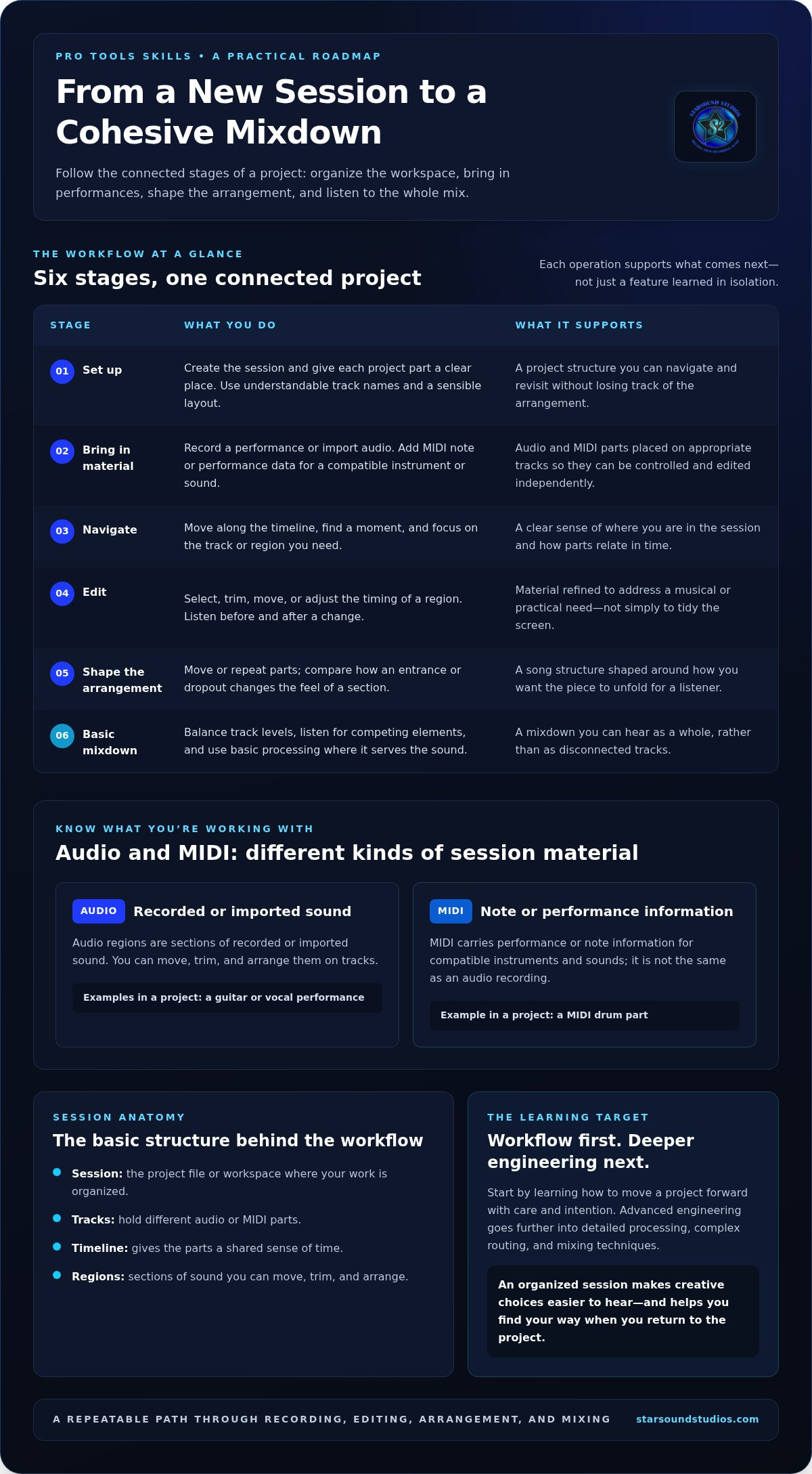
Imagine building a simple song demo with a guitar, a vocal, and a MIDI drum part. The order matters: setup creates the workspace; recording and importing bring performances in; editing shapes timing and arrangement; then basic mixing balances the parts so they can be heard together.
- Set up the session and create a clear place for each part.
- Record or import the material, then check that each performance is on the intended track.
- Edit and arrange the parts, removing unwanted sections and shaping the song’s flow.
- Make a basic mix by balancing levels and listening to how the elements work together.
That’s workflow competence: moving a project forward with care and intention. Advanced engineering goes deeper into decisions such as detailed processing, complex routing, and mixing techniques. A beginner doesn’t need to master every tool at once. Learn the path through a project first, then let attentive listening guide what you learn next.
Pro Tools Skills: From Session Setup to Mixdown
Knowing the tools matters most when you can use them to carry a project forward. A practical Pro Tools course connects each operation to what happens next, rather than treating every feature as an isolated step. Session setup gives a project its structure; recording, editing, arrangement, and mixing turn that structure into a cohesive mixdown.
Build and organize a workable session
A session is the workspace for a project, and its tracks keep different elements separate and manageable. You might record a piano directly, import a percussion recording, and add MIDI notes for a separate instrument part. Name tracks by their role and keep the material arranged clearly. That makes it easier to locate a sound, revise a section, or hand the project to someone else.
- Set up the session. Create a project and decide how to group its parts. A simple instrumental might have separate tracks for piano, percussion, a bass part, and a MIDI instrument. Clear labels give you a map before the session gets busy.
- Bring in sound and performance information. Record audio into tracks or import existing audio files. MIDI can be recorded or added as note and performance data for an instrument. Keep each element on an appropriate track so you can control and edit it independently.
- Navigate with purpose. Move along the timeline to find a particular moment, then focus on the relevant track or region. Practise locating a phrase or transition without losing your place in the arrangement.
- Edit the material. Trim a region, remove an unwanted sound, or adjust the timing of a part. Listen before and after each change. An edit should solve a musical or practical problem, not simply make the screen look tidy.
- Shape the arrangement. Move or repeat parts to develop the structure. For example, compare how a percussion pattern feels when it enters earlier or drops out before a new section. Arrangement changes the listener’s experience of the piece.
- Build a basic mixdown. Balance track levels, listen for elements that compete, and use basic processing where it serves the sound. Then prepare a mixdown to hear the project as a whole, rather than as a set of disconnected tracks.
Edit, process, and shape a basic mix
Editing refines the material already recorded; arranging decides how that material unfolds over time. Processing can help shape an individual sound, while mixing considers how all the parts sit together. These skills are connected, but they are not interchangeable. Try taking a short piece from a blank session through recording or import, edits, arrangement choices, level balancing, and a finished mixdown. Completing the full loop shows how each decision affects the next.
For learners who want to develop these skills through practical audio education, Starsound Studios offers masterclasses that include Pro Tools, grounded in a professional studio environment. Explore Starsound Studios’ audio education to connect DAW operation with real production workflows.
Pro Tools Course, Self-Paced Study, or Tutorials: Which Fits?
The best learning format depends on what helps you keep moving: a planned sequence, the freedom to explore, or direct practice on your own work. Compare options by their feedback, pace, learning order, and practical application. A pro tools course and independent practice aren’t competing choices. Combining them can give you both direction and room to experiment.
| Approach | Feedback | Pace and sequence | Applying skills |
|---|---|---|---|
| Structured course | May include instructor guidance and feedback. | Follows an organized learning path; pace depends on the course format. | Exercises can connect concepts to a broader workflow. |
| Self-paced resources | Usually requires you to identify and resolve questions independently. | You choose what to study and when, so you also manage the sequence. | Application depends on creating your own practice tasks. |
| Tutorials and documentation | Typically focused on explaining a particular feature or question. | Useful in short sessions, but you decide how separate topics fit together. | Try the demonstrated technique in a session of your own. |
| Independent project practice | Feedback comes from your own review or another listener. | You set the pace and choose the project’s order of work. | Directly applies skills to a complete piece of work. |
When does structured instruction help most?
Structured instruction can help when you’re unsure what to learn first or how one DAW concept affects another. A guided sequence gives you a route through topics, and instructor guidance can help clarify workflow questions as they arise. Avid’s PT101 is one example of a course offered through eLearning and instructor-led options. Those formats show two ways to follow organized instruction instead of building the learning path from scratch.
When can independent learning be a good fit?
Self-directed learning works well when you have a specific question, such as how to import a file or make a precise edit. Tutorials and documentation can help you find an answer quickly. The tradeoff is that you choose the order and supply the practice. To connect individual lessons, apply each useful technique to one session-based exercise and carry that project through several stages.
For example, after studying a lesson on editing, use it to refine a short recording. Then organize the session and make a simple balance of its parts. This reveals whether you can transfer the idea beyond the tutorial. If you hit a snag, return to a focused reference or seek guided input, then keep working on the same project.
Studio masterclasses offer another route: learning in a professional studio environment with an experienced engineer. Starsound Studios’ Audio Education masterclasses include Pro Tools and Logic Pro. You don’t have to choose only one method. Use structured teaching to establish direction, targeted resources to answer specific questions, and hands-on projects to make the workflow your own.
How to Choose a Pro Tools Course for Your Goals
Start with the work you want to do, not the longest feature list. A suitable pro tools course should meet you at your current level, teach skills you can apply to your projects, and provide a structure that helps you progress. Before choosing a learning route, write down what you can do now, what you want to do next, and where you tend to get stuck.
- Starting point: Can you already navigate a DAW, record audio, or make basic mix decisions, or are you new to all of it?
- Target skills: Do you want to create and manage sessions, edit performances, work with MIDI, or build a more systematic production workflow?
- Teaching structure: Do you learn best from an ordered sequence, instructor guidance, self-paced lessons, or a combination?
- Practice: Will you work on a real project while learning, and can you get useful feedback when a workflow question comes up?
Match the learning level to your starting point
Avid states that PT101 requires no Pro Tools experience, while basic knowledge of audio, DAWs, recording, and mixing can be useful. That distinction helps you judge whether a course is open to beginners and what preparation may make the material easier to absorb. Identify specific gaps first. You may understand recording but need help organizing sessions, or know another DAW but want to learn Pro Tools’ workflow.
If you’re a beginner, look for learning objectives that start with core operations and build toward a complete task. If you already use audio software, prioritize parts of your workflow that feel inconsistent, such as editing efficiently or preparing a session for later mixing. For broader context on the profession and its creative demands, connect your software goals with the guide to sound-engineering craft and career paths.
Check outcomes, practice, and certification expectations
Compare a course’s stated outcomes with tasks you actually want to perform. If your goal is to record and edit a demo, prioritize those skills and opportunities to apply them. If you want a more systematic production workflow, look for a sequence that connects setup, recording, editing, and mixing instead of covering tools as isolated topics. Then plan a practice project that lets you test each skill.
Keep training and credentials distinct. Avid’s certification path uses Pro Tools Fundamentals I (PT101) and Pro Tools Fundamentals II (PT110) as foundation training for the Specialist exam. Completing one course alone doesn’t award Avid certification; the credential involves the required courses and passing the formal exam. Choose that route if a formal credential is part of your goal, and choose practical instruction for skills you want to use in your sessions.
For a hands-on learning environment, Starsound Studios’ Audio Education masterclasses include Pro Tools and Logic Pro, with learning grounded in a professional studio and an engineer’s experience. Explore studio-based audio education as a practical next step for building skills around your production goals.
Learn Pro Tools in a Professional Studio Environment at Starsound
Software skills become more meaningful when you can connect them to the way audio is recorded and developed. Starsound Studios offers Audio Education through masterclasses that include Pro Tools and Logic Pro. For musicians, producers, and aspiring audio engineers, this is a practical learning route grounded in a professional studio environment.
Starsound Studios’ instruction is supported by a Pro Tools-certified engineer with decades of studio experience. That background can put DAW concepts in context: not just where to find a tool, but how software decisions relate to recording and production work. A pro tools course is most useful when it helps you build skills you can carry into your own sessions.
Connect software learning with real studio practice
A professional studio offers a setting where the stages of audio work feel connected. Session organization, recording choices, editing, and mix decisions all serve the same project. Learning in that environment can make the workflow more tangible and help you see how a change in one part of a session affects the work that follows.
The goal isn’t simply to learn software commands. It’s to understand how Pro Tools supports a broader production process. As you grow more comfortable with the DAW, you can focus more attention on the creative decisions that shape a performance and a recording. Listening remains central: tools help you act on what you hear, while experience helps you decide what the music needs.
Starsound Studios’ Audio Education includes both Pro Tools and Logic Pro. The masterclasses offer a way to build audio knowledge with instruction grounded in professional studio experience, without assuming that every learner has the same background or creative destination.
Take the next step with Starsound Studios
Whether you’re a musician aiming to manage your own sessions, a producer looking to make your workflow more consistent, or an aspiring audio engineer building practical knowledge, studio-based education can connect software learning with the larger craft of production. Start by identifying what you want to do more confidently, such as working through a session or understanding how recording choices affect later production decisions. That gives your learning a clear purpose.
Starsound Studios is in North Royalton, Cleveland, Ohio, making its Audio Education masterclasses a local option for learners in the area. The studio’s Pro Tools-certified engineer brings decades of experience to a setting centered on audio work and learning.
If you’re ready to bring your creative goals into a focused learning environment, explore Audio Education at Starsound Studios and consider how Pro Tools or Logic Pro can support the work you want to make.
Make Your Next Session a Learning Opportunity
The next step doesn’t have to be mastering every tool. Choose one skill you want to use more confidently, then put it to work in a real project. A focused pro tools course can give that effort direction, while each session helps turn new knowledge into a creative habit.
If you’d like to learn in a professional studio setting, Starsound Studios offers Audio Education masterclasses in Pro Tools and Logic Pro, guided by a Pro Tools-certified engineer with decades of studio experience. Bring your curiosity and the kind of work you hope to make. A focused learning environment can help you move from navigating the software to shaping your ideas with greater intention.
Explore Audio Education at Starsound Studios and take a purposeful next step toward the sound you want to create.
Frequently Asked Questions
Do I need experience with Pro Tools before taking a course?
No. Avid states that PT101 doesn’t require prior Pro Tools experience, though basic audio and DAW knowledge can help you get more from it. If you’re new to production, look for beginner instruction that explains unfamiliar terms and gives you time to try each operation. Before enrolling, note what you already know, such as recording a vocal or balancing a simple multitrack session, and use that to judge whether a pro tools course fits your starting point.
How long does it take to learn Pro Tools?
It depends on your experience, practice routine, and what you want to do with the software. Avid lists PT101 as 14 hours for eLearning or 16 hours of instructor-led training. Those figures describe the course, not the time needed to master every workflow. After a lesson, try repeating the task without instructions, then apply it to a different piece of audio. That will show what’s becoming familiar and where you need more practice.
Does completing a Pro Tools course make you Avid certified?
No, completing a course by itself doesn’t mean you’re Avid certified. Avid identifies Pro Tools Fundamentals I (PT101) and Pro Tools Fundamentals II (PT110) as foundation training for the Avid Certified | Pro Tools Specialist exam. Training and certification are separate steps: the certification path includes passing the formal exam. If a credential matters for your plans, distinguish courses that teach practical skills from the specific preparation and assessment required for certification.
Can I learn Pro Tools online, or should I attend in person?
Either can work; choose based on how you stay engaged and get questions answered. Avid lists both eLearning and instructor-led options for PT101. Online learning may suit someone who prefers independent study, while scheduled instruction provides a set learning environment. Whichever you choose, set aside time to practise between lessons. Learners in Cleveland can also explore studio-based Audio Education masterclasses and consider which learning setting best supports their goals.
What should I practise while learning Pro Tools?
Practise by completing a small task, then repeat it without relying on step-by-step instructions. For instance, bring a short recording into a session, label the tracks, make an edit, and listen back to check whether the change serves the performance. Keep a brief note of what you did and any question that came up. Avid’s PT101 description includes hands-on exercises and project materials, which can give learners a structured starting point for practice.
Is a Pro Tools course useful if I already use another DAW?
Yes, especially if a project or collaborator calls for Pro Tools. Your existing DAW experience can help you understand concepts such as tracks, editing, and signal flow, even if the controls and terminology differ. Make a short list of what transfers easily and what feels unfamiliar. For example, you may be comfortable recording multiple tracks but need to learn how Pro Tools organizes sessions. Use that gap to focus your study rather than starting from zero.


