

A clean, clearly labeled mix and a careful upload are central to sending files for online mastering securely. Before you send a track, confirm that the mix reflects your intended balance, export a suitable audio file, and use the mastering service’s designated transfer process rather than an open or unfamiliar link.
It’s natural to want every detail right before your music leaves your hands. Sending files for online mastering securely means choosing the right file and transfer method while preserving the sound you’ve worked hard to shape.
This guide explains how to prepare a mix, choose an audio format, and upload files carefully. You’ll learn practical steps for sending files for online mastering securely and what to expect when your master is delivered, so you can move from final mix to release with a clearer picture of each step.
Key Takeaways
- Choose an audio export that preserves your mix clearly, and keep track of the format and version you send.
- Before uploading, listen through the full mix and make sure it reflects the balance and sound you want mastered.
- Use the intended file-transfer process, label your files clearly, and know what to expect when the mastered versions are delivered.
- Learn how file format, bit depth, and sample rate affect the mastering handoff, so you can prepare your release with confidence.
Supported audio file formats
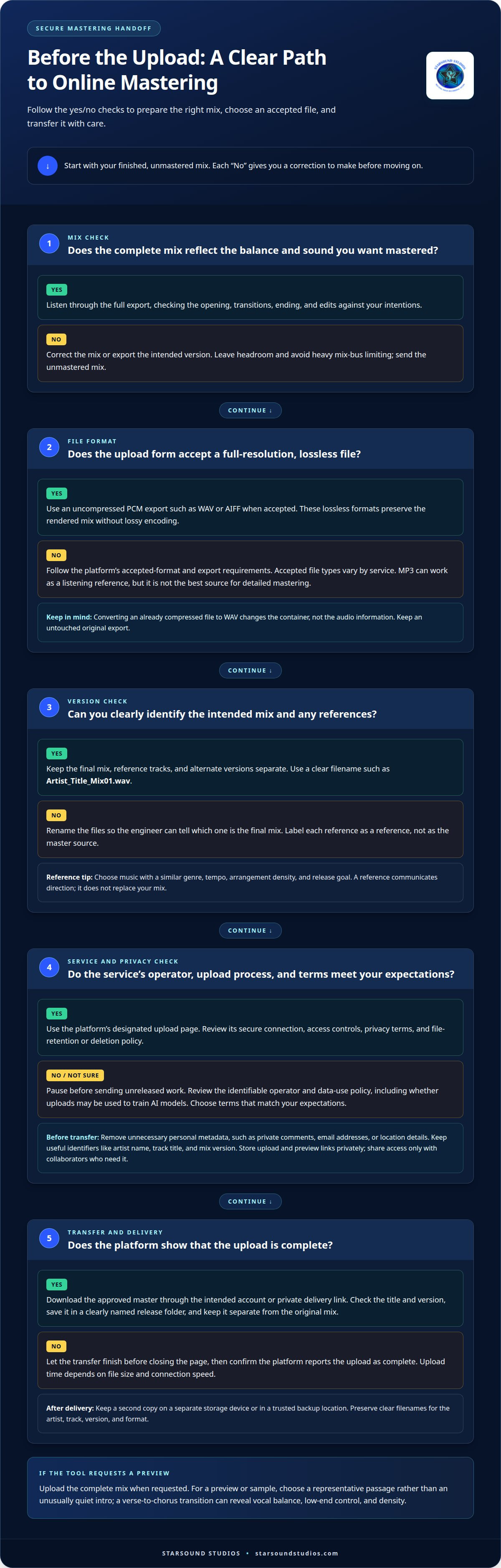
For sending files for online mastering securely, start with a full-resolution, uncompressed PCM export when the upload form accepts it. WAV and AIFF are common lossless choices; both preserve the mix without the data reduction used by MP3. An MP3 can work for listening references, but it isn’t the best source for detailed audio mastering. The portal’s accepted-format list determines which file types you can submit.
Keep the original recording export separate from reference tracks and alternate versions. A clear filename such as “Artist_Title_Mix01.wav” helps distinguish the intended mix from a rough bounce. If you include a reference, label it as a reference rather than the master source. That small step helps engineers identify which file represents your final balance and which illustrates a creative direction.
Browser-based mastering tools may analyze or process audio through a web interface. Other applications process audio on your device before you upload a rendered file. The difference matters: browser tools rely on the service’s upload workflow, while local software may let you audition processing before exporting. In either case, keep an untouched copy of the original mix.
For track analysis, upload the complete mix if the tool requests a full song. If it offers a preview or sample option, choose a representative passage rather than an unusually quiet intro. A verse-to-chorus transition can reveal vocal balance, low-end control, and density. Artists sending files for online mastering securely can use that same section to compare a polished reference with the current mix, while keeping the full track available for mastering.
Online mastering platforms may offer different input formats and processing profiles. Choose a profile that fits your release goals, then listen before downloading the result. Compare it with your source at a similar playback level: louder playback can seem more impressive without sounding more balanced. Name the original upload and final download clearly so you can identify each version during release preparation.
How should I prepare my mix before uploading it for mastering?
Assess a service’s legitimacy by reviewing its identifiable operator, privacy terms, data-use policy, and upload process. Remove unnecessary personal metadata, such as private comments or contact details embedded in file tags.
Preparing the Mix for Upload
Export the finished mix without mastering processing on the stereo bus. Leave headroom and avoid heavy mix-bus limiting so the mastering engineer can shape the dynamics rather than undo a loudness ceiling. Listen to the complete export before uploading, checking the opening, transitions, ending, and edits against your intentions. Upload the correct unmastered version and use the preview to catch a wrong bounce, missing section, or unintended fade before submitting.
A reference track can communicate your direction, but it should not replace your mix. Choose music with a similar genre, tempo, arrangement density, and release goal. Label it separately so it isn’t mistaken for the source track.
Recommended Lossless Formats
When accepted by the upload platform, use an uncompressed lossless export such as WAV or AIFF. These formats preserve the rendered mix without lossy encoding, making them suitable sources for professional mastering. Follow the platform’s format and export requirements, as accepted file types can vary. Converting an already compressed file to WAV changes the container, not the audio information. Keep a separate, untouched original export for reference.
Secure Upload and Private Storage
Use the platform’s designated upload page, and review its secure connection, access controls, privacy terms, and file-retention or deletion policy. The data-use policy should explain whether uploaded music may be used to train AI models. Choose a service whose terms match your expectations for private, unreleased work.
Before uploading, remove unnecessary metadata such as personal email addresses, private notes, or location details from file tags. Keep useful identifiers, including artist name, track title, and mix version. Store the upload and preview link privately, and share access only with collaborators who need it for the release.
Mastered-file delivery and support
Delivery connects your mix, the mastering process, and release preparation. File size and upload time depend on the audio export and transfer connection, while storage choices depend on the delivery method.
Upload Size and Timing
A high-quality source file gives the mastering process more audio detail to work with. A lossless stereo export preserves the production’s sound without adding lossy compression; processing cannot restore detail lost in an already compressed source. If a mastering tool analyzes the upload before processing, submit the intended final mix rather than a temporary bounce.
Mastered-file size depends on duration, format, sample rate, bit depth, and whether delivery includes stereo or alternate versions. Upload time depends on file size and your connection’s upload speed. For a large file, let the transfer finish before closing the page, then confirm that the platform shows the upload as complete.
Track-length and stem limits vary by service and workflow. Before preparing stems, find out whether the upload calls for a stereo mix or separate groups, such as vocals and instrumental parts. Follow the stated duration and file limits. Supplying extra stems can create a different mastering process from working with a finished stereo mix.
Secure Download and File Backups
Download the approved master through the platform’s intended account or private delivery link. Save it in a clearly named release folder, then compare its title and version with the delivery details. Keep the original mix separate so you don’t confuse the master with the source during production.
Create a second copy on a separate storage device or in a trusted backup location. Preserve useful filenames, such as artist, track, version, and format, rather than naming everything “final.” If the platform provides a preview, listen to it first, then download and audition the complete master before distribution.
For subscription platforms, review how long downloads remain available and whether you can access stored projects if your plan changes. Keep your own backup rather than relying on an online account as your only archive. This helps keep the approved master available for release delivery and future production needs.
What audio file formats, bit depth, and sample rates should I send for online mastering?
Send a lossless export that preserves the mix from your recording session. WAV and AIFF are common options, but let the upload platform’s accepted formats guide your choice. Keep the stereo file at its native sample rate and bit depth when exporting, rather than changing settings just to create larger numbers.
Sample rate describes how frequently audio is sampled during digital conversion, while bit depth describes the resolution available to represent each sample. Both reflect choices made in the recording and production workflow. Preserve the session’s original settings in your export; converting to higher settings later cannot recreate detail that wasn’t captured.
Before rendering, open your audio workstation’s export settings and select an uncompressed lossless format. Confirm that the file is stereo, uses the intended session values, and contains the complete mix. Don’t submit a low-resolution preview when the mastering upload calls for the finished source export. Follow the platform’s specifications if it requests a particular format or setting.
Avoid sending an MP3 as the sole source when a lossless export is available. Lossy compression removes audio information, and converting that MP3 to WAV won’t restore it. Keep an untouched copy of the original session export, then name the upload with the artist, track title, and mix version. That makes it easier to distinguish the mastering source from reference audio or an earlier bounce.
Check the rendered file before uploading by playing its opening, loudest passage, and ending. Confirm that the stereo image sounds as intended and that the export has no accidental clipping, missing section, or unwanted fade. If the mastering platform specifies file requirements, follow them rather than guessing. A consistent source file helps preserve the production’s character through mastering.
Ready to prepare a release-ready master? Start your mastering project with a lossless export from your session.
Starsound Studios
Starsound Studios helps artists move from a finished mix toward a release-ready master, with a clear path for remote projects. Its services include Stereo Mixing, Mastering, Remote Mixing, and Remote Mastering, supporting projects at different stages of production. Artists developing an immersive release can also explore Dolby Atmos Mixing (9.1.4), while Recording is available for work that needs to begin earlier in the process.
Bring your prepared mix and release goals into the conversation when you’re ready for experienced audio support. Contact Starsound Studios to discuss the next step for your project.
Give Your Release a Confident Next Step
Your mix carries the choices, energy, and identity you shaped in the studio. A thoughtful handoff keeps those intentions clear as the project moves toward its final sound. Treat sending files for online mastering securely as part of release preparation: preserve the creative work, communicate your direction, and make time to listen carefully before the finished master moves forward.
When you want an experienced team to help shape that next stage, Starsound Studios offers Stereo Mixing, Mastering, and Dolby Atmos Mixing (9.1.4). The right approach depends on where your track is in production and how you envision listeners experiencing it. Keep the artist’s intent at the center, whether you’re refining a stereo mix or developing an immersive presentation.
Bring your project’s direction into the next conversation and keep its creative momentum moving. Contact Starsound Studios about mastering to discuss your release. Your sound has a story worth carrying forward.
Frequently Asked Questions
Which formats are supported?
WAV and AIFF are common lossless formats for mastering, but each upload portal sets its accepted file types. Check the platform’s upload instructions before exporting, especially if your session uses a less common format. For example, keep an MP3 as a listening reference rather than converting it to WAV and treating it as a lossless source. The conversion won’t restore audio data removed by compression.
How does it work?
Online mastering generally begins when you submit a mix and project details through a service’s upload process. The mastering workflow uses your source audio to create a finished version, which you can review and download through the specified delivery method. For remote mastering with Starsound Studios in North Royalton, Cleveland, Ohio, clear track names and concise notes about your intended sound help connect your creative direction with the audio you submit.
How should I export and prepare a mix for mastering?
Export the complete stereo mix from your audio workstation without adding a final loudness limiter to the mix bus. Listen to the rendered file from beginning to end, checking for an unexpected mute, edit, or truncated ending. If you’re sending several versions, make the selected mix unmistakable in its filename. Include a reference track separately, with a short note about what you admire in its sound.
What secure file transfer methods do online mastering services offer?
Online services may provide a private account portal, a project-specific upload page, or a restricted file-sharing link. The method varies, so use the service’s intended transfer route rather than posting unreleased audio on a public page. If collaborators need access, share the project through a controlled method and avoid forwarding a private link beyond the people involved in the release.
Do online mastering services use encryption or password-protected uploads?
Some services use encrypted connections or password-protected delivery, but these protections aren’t universal. Review the service’s privacy and security information for details about upload encryption, access permissions, storage, and file deletion. A password can limit access to a shared file; encryption protects data during transfer or storage, depending on how it is implemented. Don’t assume one protection automatically means the other is in place.
What are the risks of sending unreleased music to an online mastering service?
Potential risks include unauthorized access, accidental sharing, unclear data-retention practices, or terms that allow uploads to be used beyond processing. Before submitting a track, understand who can access project files, how the service handles stored audio, and whether its terms permit AI training use. Keep a private backup, share access only with necessary collaborators, and avoid including personal details in audio metadata.


