

Did you know that 85% of tracks failing to meet the -14 LUFS standard face immediate penalties from Spotify's normalization algorithms? It's a staggering figure that highlights the gap between a bedroom demo and a world-class release. You've likely felt that sting of disappointment when your hard work sounds squashed or strangely quiet compared to a major label hit. We understand that frustration. Your music deserves to breathe; it needs to hit with impact and command the listener's attention without being crushed by a hidden limiter. Mastering for spotify loudness normalization isn't about hitting a technical ceiling. It's about finding the sweet spot where precision engineering meets raw creative energy.
In this guide, we'll demystify the 2026 standards to help you achieve a competitive, professional sound. You'll learn to navigate the -14 dB LUFS target while maintaining the punch and clarity that defines your unique sonic identity. We'll explore the critical role of True Peak limits and explain when it's time to bring your project into a dedicated mastering environment. From understanding the "Loud" mode's limiter to preserving dynamics for a vibrant playback experience, you're about to master the science behind the art. Let's ensure your next release sounds exactly as you envisioned it.
Key Takeaways
- Understand how to navigate the technical "safe zones" of LUFS and True Peak to protect your audio fidelity during lossy encoding.
- Learn why the default spotify loudness normalization target is often a myth and how mastering for genre impact can yield better results than mastering for the algorithm.
- Uncover the risks of the "Loud" playback setting and how Spotify's internal limiter can impact the transients and clarity of your work.
- Discover the importance of micro-dynamics and frequency management in creating a master that sounds consistently powerful across every device.
- Recognize the distinct advantages of a seasoned engineering ear over AI presets when it comes to achieving professional-grade competitive loudness.
Demystifying Spotify Loudness Normalization: Why Your Tracks Change Volume
Imagine spending weeks perfecting a mix, only to hear it lose its edge the moment it hits a playlist. That's the byproduct of audio normalization. At its core, spotify loudness normalization is a playback-side gain adjustment. It isn't a permanent change to your file. Instead, Spotify scans your audio upon upload, calculates its average loudness, and then adjusts the volume knob for the listener to ensure a consistent experience across every device. This ensures that a folk ballad doesn't get buried by a heavy metal track, and a commercial hit doesn't blow out a listener's eardrums.
This system exists to end the "Loudness War," a decades-long arms race where engineers crushed dynamic range just to be the loudest song on the radio. By 2026, streaming platforms have shifted the focus back to quality. Now, a track with a massive dynamic range can sit comfortably next to a heavy club banger without the listener reaching for their volume control. "Quiet" songs aren't actually quiet in this ecosystem; they simply have more room to breathe. The algorithm measures the energy of your track from start to finish, ensuring the perceived volume feels right, regardless of the genre.
Normalization vs. Compression: Knowing the Difference
It's vital to realize that normalization is a transparent gain shift. It's like someone turning a physical volume knob up or down. It doesn't change the relationship between your quietest and loudest moments. Compression and limiting, however, happen in your DAW. Those processes actually reshape your waveforms and impact the "feel" of the music. If your track is too quiet, Spotify might apply "Positive Gain," but they leave 1 dB of headroom. A track at -20 dB LUFS with a -5 dB peak won't reach the full -14 target; it'll stop at -16 to avoid clipping. This is why getting your levels right before upload is non-negotiable.
The ITU 1770 Standard and -14 dB LUFS
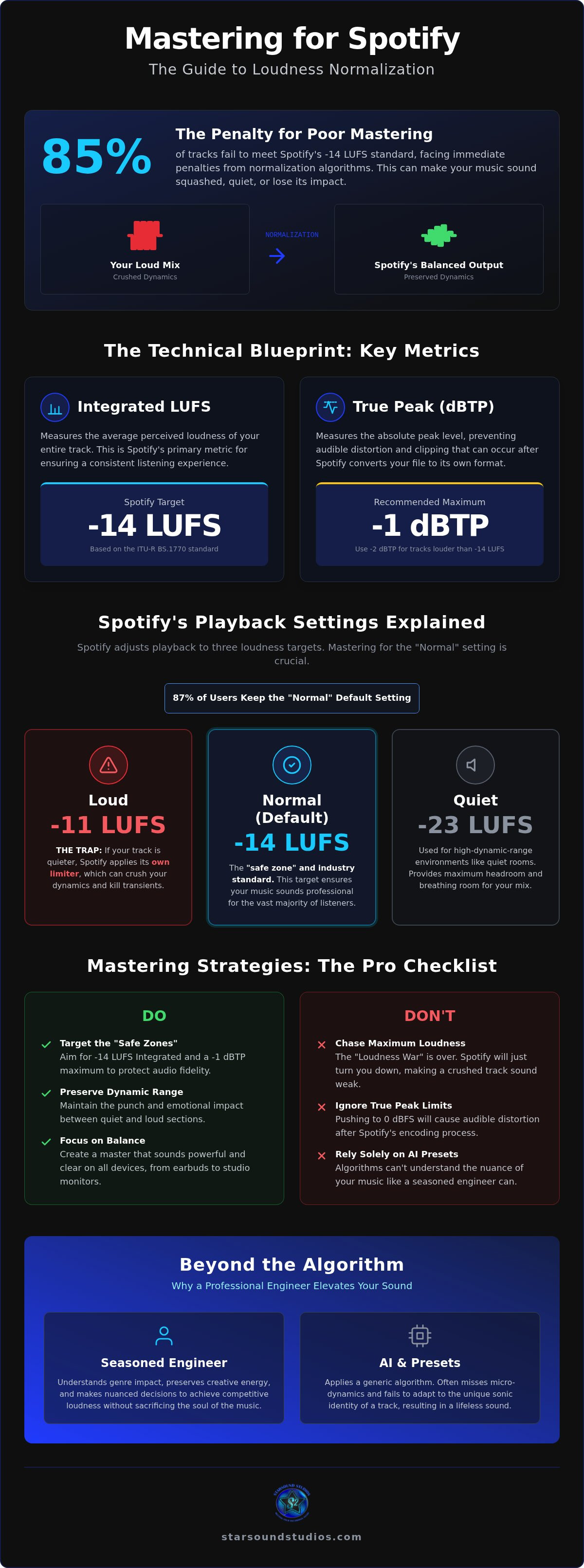
Streaming platforms rely on the ITU-R BS.1770 standard to keep things uniform. This technical blueprint ensures that loudness is measured consistently across different devices and software. The -14 dB LUFS target became the "magic number" because it provides enough headroom for most genres to sound great while maintaining enough energy for mobile listeners. LUFS is the industry standard for measuring human-perceived loudness. By sticking to this benchmark, spotify loudness normalization ensures that 87% of users, who keep the default settings, enjoy a seamless transition between every track in their library. It's the bridge between technical precision and the listener's emotional experience.
The Technical Blueprint: LUFS, True Peak, and Spotify’s Standards
Mastering is a game of millimeters. To win, you need to understand Integrated LUFS, which calculates the average loudness of your entire track. It isn't just about the loudest hit; it's about the cumulative energy from the first beat to the final fade. Following AES loudness standards ensures your work translates across professional playback systems. While the target for spotify loudness normalization is -14 LUFS, your Loudness Range (LRA) determines the emotional journey. Since 87% of users keep the default "Normal" setting, hitting these technical marks is the difference between a professional release and a missed opportunity. A healthy LRA maintains that vital gap between an intimate verse and an explosive chorus, preventing your master from feeling like a flat, tiring wall of sound.
Headroom and the -1 dB True Peak Rule
Headroom is your best friend. True Peak (dBTP) measures the actual peaks of your analog signal, which often exceed traditional digital ceiling levels. We recommend a maximum of -1 dBTP for a simple reason: transcoding. When Spotify converts your high-res file into Ogg Vorbis or AAC formats, the mathematical reconstruction can create "intersample peaks." These peaks lead to audible distortion if your master is too hot. For tracks mastered louder than -14 LUFS, a ceiling of -2 dBTP is even safer. High-quality sample rate conversion during the final bounce is the secret to keeping your transients crisp and your high-end silkier.
Album Normalization: Preserving Artistic Intent
Spotify understands that albums are cohesive stories. When a listener plays an entire record, the platform uses album normalization. This means it looks at the loudness of the whole project and applies a single gain shift to every track. If your lead single is a -9 LUFS powerhouse and your ballad is a delicate -18 LUFS, the ballad stays quiet. This preserves your artistic intent. However, when those tracks enter a shuffled playlist, individual spotify loudness normalization takes over. Each song is adjusted independently to hit that -14 LUFS mark. Balancing these two worlds requires a delicate touch. If you want to ensure your project translates perfectly in both scenarios, our professional mastering services provide that essential final polish.
The 'Loud' Setting Trap: How Normalization Can Impact Audio Fidelity
Spotify provides listeners with three distinct ways to experience your music: Quiet (-19 LUFS), Normal (-14 LUFS), and Loud (-11 LUFS). For most creators, the "Normal" setting is the gold standard. It balances volume and dynamics perfectly. However, the "Loud" setting is a different beast entirely. Unlike the other modes, which primarily use simple gain adjustments, the "Loud" setting engages a peak limiter. This isn't a mere volume shift; it's a fundamental change to your audio's architecture. Mastering for spotify loudness normalization requires a strategic approach to these playback tiers to ensure your artistic vision survives the trip to the listener's earbuds.
The danger lies in the technical specs of Spotify's internal limiter. It operates with a fixed 5ms attack and 100ms decay. In the high-stakes world of professional audio, a 5ms attack is remarkably slow. It's just long enough to let the initial "crack" of a snare drum or the "thump" of a kick pass through before the limiter clamps down hard on the rest of the signal. This creates an unnatural, "pumpy" sound that can ruin a carefully crafted mix. Understanding these loudness standards is vital for any producer who wants their work to sound professional rather than processed. Audiophiles and veteran engineers almost universally recommend the "Normal" setting because it preserves the master's integrity without unnecessary interference.
When Positive Gain Goes Wrong
Problems escalate when a dynamic, quiet master meets the "Loud" setting. If your track sits at -18 LUFS, the algorithm attempts to boost it by 7 dB to reach the -11 target. Because the limiter is active, your transients are sacrificed for raw volume. This is where the "Loudness Penalty" becomes a physical reality. Mastering too quiet is just as risky as mastering too hot. Both paths allow the algorithm to reshape your sound in ways you didn't intend. It's a delicate balance that requires a seasoned ear to navigate correctly.
Listener Behavior and Default Settings
Data from April 2026 confirms that 87% of Spotify users never change the default "Normal" setting. This is a win for creators who value dynamic range. It means the vast majority of your audience hears your music exactly as it was intended in the studio. You should design your master for this default listener. Educate your fanbase. Encourage them to keep their settings on "Normal" or "Quiet" for the most immersive experience. When they hear the depth and energy of a world-class master, they'll understand why avoiding the "Loud" trap is essential for true audio fidelity.
Mastering Strategies for 2026: Balancing Impact with the Algorithm
Mastering for the modern era isn't about chasing a single number. It's about ensuring your artistic vision translates with power and clarity regardless of the playback volume. While spotify loudness normalization targets -14 LUFS, sticking strictly to that number can often leave your track sounding thin and uncompetitive compared to major label releases. We view the algorithm as a safety net, not a creative ceiling. By focusing on how your music feels rather than just how it measures, you can create a master that commands attention the moment the beat drops.
The -14 dB LUFS Myth Debunked
There's a common misconception that mastering to -14 LUFS is the only way to avoid the "loudness penalty." In reality, most professional masters in 2026 still land between -9 and -7 dB LUFS. Why? Because a master with controlled peaks and high density often sounds fuller and more energetic than a quieter, more dynamic one, even after Spotify turns it down. Competitive masters prioritize density over raw LUFS numbers. This approach ensures that your track retains its weight and authority, providing that "expensive" sound listeners expect from top-tier productions. It's better to have a powerful master turned down by the platform than a weak master that lacks the necessary impact to compete.
The secret to a loud master that still feels punchy lies in micro-dynamics. This involves preserving the initial transients of your drums while controlling the overall energy of the track. If you crush everything into a flat line, you lose the impact that makes people dance. Use the "loudness penalty" as a guide, not a rigid rule. If your track is turned down by 3 or 4 dB but still hits harder than everything else in the playlist, you've won. It's about finding the balance where energy meets the technical requirements of the platform without sacrificing the soul of the song.
Mastering for Dolby Atmos in 2026
The landscape is shifting with the rise of immersive audio. Unlike stereo tracks, Atmos masters are normalized to -18 LKFS. This lower target provides massive headroom, allowing for a level of dynamic range and spatial clarity that stereo simply can't match. When you step into our 9.1.4 immersive environment, your perception of volume changes. You aren't just hearing sound; you're feeling the space around you. If you're ready to explore this new frontier, check out our guide to Dolby Atmos Mixing in Cleveland to see how we're elevating Ohio's sound. Navigating these two standards requires a nuanced approach. If you want your release to stand out on every platform, our remote mastering services bridge the gap between technical specs and artistic excellence.
Beyond the Algorithm: Why Professional Mastering Elevates Your Sound
Algorithms are tools, not artists. While AI mastering services have become ubiquitous by 2026, they often rely on rigid presets that ignore the soul of your production. These automated systems can't distinguish between a deliberate artistic choice and a technical flaw. They simply apply a generic curve to hit a target. This is where professional mastering transcends the numbers. A seasoned engineer identifies frequency masking, where competing sounds "blur" together and reduce your track's perceived impact. By clearing this sonic clutter, we create space for your music to sound louder and clearer without triggering the aggressive side of spotify loudness normalization.
High-end analog gear plays a massive role in this process. Unlike digital plugins that can sometimes sound brittle when pushed, quality outboard equipment adds a "musical" weight and saturation. It rounds out the transients in a way that feels natural to the human ear. This creates a sense of authority that translates across every playback system, from high-fidelity home theaters to smartphone speakers. At Starsound Studios, we bridge the gap between your local Cleveland vision and global industry standards, ensuring your identity remains the priority throughout the technical journey.
The Human Element: Steve "The Mix" and Starsound
A collaborative mentor is worth more than a thousand lines of code. Steve "The Mix" brings decades of expertise to every project, providing the grounded assurance that your technical details are handled with absolute precision. We don't just process files; we invest in your vision. This human touch ensures your tracks translate from our studio to Spotify flawlessly, maintaining the energy and spirit you poured into the recording. If you want to dive deeper into our process, explore our guide on Professional Mastering in Cleveland.
Preparing Your Music for Distribution
Before you hit "Upload," a final checklist is essential. Ensure your files are at the correct sample rate and bit depth to avoid artifacts during the platform's conversion process. Choosing between WAV vs. AIFF formats is a critical step for high-fidelity delivery, as these uncompressed formats preserve every nuance of your master. Don't let your hard work be undermined by a technical oversight in the final hour. Mastering for spotify loudness normalization is a science, but delivering a world-class result is an art. Ready for a master that stands the test of time? Contact Starsound Studios for mixing and mastering services today and let's bring your project to its highest potential.
Command Your Sonic Future in 2026
Navigating the complex world of streaming standards doesn't have to feel like a compromise. You've learned that mastering for spotify loudness normalization is about more than just hitting a -14 LUFS target; it's about preserving the emotional impact and transient energy that makes your music unique. By understanding the technical nuances of True Peak limits and the risks of the "Loud" setting, you've taken the first step toward ensuring your tracks sound professional on every device. Precision engineering is the bridge that carries your artistic vision to the listener's ears without losing its soul.
At Starsound Studios, we're dedicated to helping you reach your highest potential. As Ohio’s only Dolby-certified 9.1.4 Atmos facility, we provide a high-end sanctuary where industry veteran Steve "The Mix" handles the technical heavy lifting. Whether you need expert stereo mastering or immersive post-production, we're here to ensure your work stands out in a crowded market. Don't let an algorithm dictate your sound. Elevate your sound with professional mastering at Starsound Studios and release your next project with absolute confidence. Your music is ready for the world; let's make sure it sounds like it.
Frequently Asked Questions
Does Spotify loudness normalization ruin audio quality?
Normalization itself is a transparent gain shift, meaning it's just like turning a physical volume knob. It doesn't change the relationship between your quietest and loudest moments. However, audio quality can suffer if you master too quiet and Spotify boosts it, or if a listener uses the "Loud" setting. That specific mode engages a peak limiter that can squash your transients. For the best fidelity, rely on professional engineering to ensure your master sounds perfect before upload.
Should I master my song to -14 dB LUFS for Spotify?
You don't have to master strictly to -14 LUFS. While that's the platform's target, many competitive masters in 2026 land between -9 and -7 LUFS. A track with higher density and controlled peaks often sounds fuller and more impactful even after spotify loudness normalization turns it down. Focus on the energy of your genre. It's better to have a powerful master that's adjusted downward than a weak one that lacks professional weight.
What is the best True Peak setting for Spotify?
We recommend a True Peak ceiling of -1 dBTP for most releases. This provides a safety margin against the distortion that occurs during transcoding into Ogg Vorbis or AAC formats. If your track is mastered louder than -14 LUFS, dropping your ceiling to -2 dBTP is a smarter move. This extra headroom prevents inter-sample peaks from clipping during the conversion process, keeping your high-end crisp and your transients defined on every device.
Why does my song sound quieter than other songs on Spotify?
This usually happens because of a lack of perceived loudness rather than just the LUFS number. If your mix has excessive sub-frequencies or uncontrolled peaks, the normalization algorithm will turn it down while the song still feels thin. Additionally, if your master is quieter than -20 LUFS, Spotify only boosts it to -16 LUFS to protect against clipping. Professional mastering solves this by balancing frequencies and increasing density so your music hits with authority.
Does Spotify normalize Dolby Atmos tracks differently?
Yes, immersive audio follows a different technical blueprint. Dolby Atmos tracks on Spotify are normalized to -18 LKFS, which is the same as LUFS in this context. This lower target allows for the massive dynamic range and spatial separation that defines the 9.1.4 experience. Because the headroom is so much higher, Atmos releases often sound more open and detailed than their stereo counterparts. It's a different world of engineering that requires specific expertise to master correctly.
What happens if I turn off loudness normalization in my Spotify settings?
When you turn normalization off, every track plays at its original, unadjusted volume. This means a crushed pop song will sound significantly louder than a dynamic jazz piece. While some audiophiles prefer this to avoid the "Loud" setting's limiter, it creates an inconsistent listening experience. Most listeners keep normalization on, so you should always master your music to sound competitive within the platform's default -14 LUFS ecosystem to ensure maximum impact.
How does Spotify’s "Loud" setting affect my music’s dynamics?
The "Loud" setting is the only mode that actively uses a limiter to reach its -11 LUFS target. This limiter has a 5ms attack time, which is slow enough to let the initial "snap" of your drums pass through before it clamps down. This can create a pumping effect or squash the body of your instruments. It's a trap for dynamic music. Professional mastering ensures your track has enough internal density to survive this process without losing its soul.
Can I check my song’s loudness penalty before uploading?
You can definitely preview how the algorithm will treat your music. Tools like the Loudness Penalty website or specialized metering plugins allow you to see exactly how many decibels spotify loudness normalization will subtract from your track. This is a vital part of the modern workflow. It helps you understand if your master is too hot or if you've found that perfect balance where your music sounds energetic and professional without being unnecessarily crushed.


