

Recording at 192kHz won't magically turn a demo into a masterpiece, but picking the wrong setting today can certainly haunt your mix tomorrow. Many artists feel a nagging pressure to chase the highest numbers possible, fearing that anything less than "ultra-high-def" will lead to aliasing artifacts or a lack of professional polish. You want your work to sound pristine, yet you're tired of your laptop fans screaming or your DAW crashing mid-take. It's a delicate balance between technical perfection and the raw energy of a great performance.
We're here to help you navigate these technical waters with the precision of a Dolby-certified facility and the heart of a fellow creator. This guide will clarify exactly what sample rate to record at to ensure your files are ready for high-end mixing and immersive mastering in 2026. We'll break down why 48kHz is the undisputed king for video, when 96kHz actually matters for sound design, and how to keep your sessions compatible with elite studios in Cleveland or across the globe. You'll gain the technical confidence to set your session and get back to the music.
Key Takeaways
- Understand the fundamental relationship between sample rates and digital snapshots to capture the true essence of your sound.
- Learn exactly what sample rate to record at to satisfy professional standards for streaming and the synchronization requirements of modern video.
- Master the balance between high-fidelity resolution and system performance to prevent DAW crashes or storage bloat during intense sessions.
- Tailor your technical settings to your specific genre, whether you are capturing the natural air of an acoustic room or optimizing heavy synth processing.
- Future-proof your creative vision by meeting the critical 48kHz minimum requirement for professional Dolby Atmos and immersive audio delivery.
What is Sample Rate? Demystifying Digital Audio Foundation
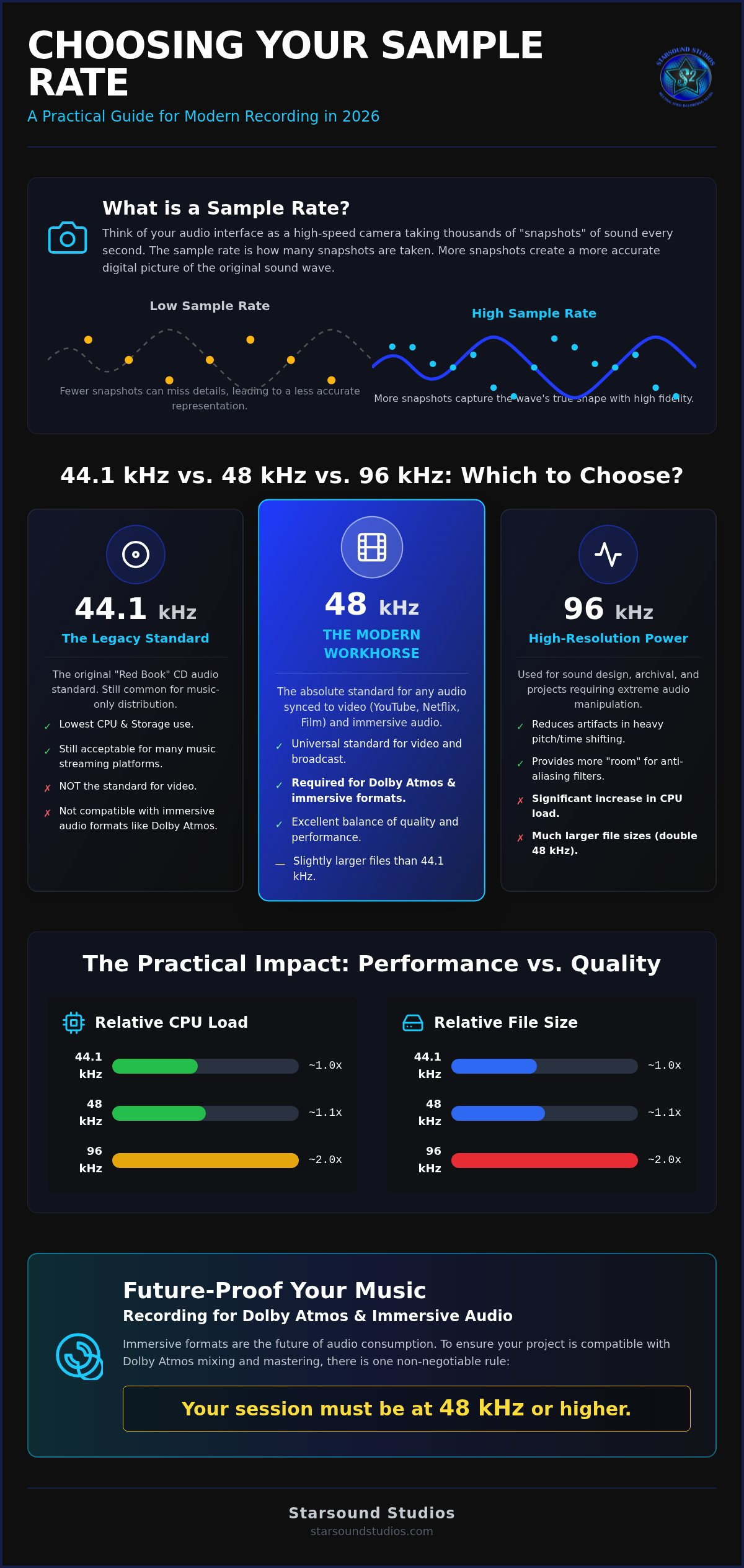
Digital audio can feel like a magic trick. You sing into a high-end microphone, and suddenly, a sequence of ones and zeros captures the soul of your performance. At its core, this process relies on sampling. Think of your audio interface as an incredibly high-speed camera. Instead of capturing light, it takes snapshots of electrical voltage tens of thousands of times every second. This frequency of snapshots is your sample rate. It is the pulse of your digital session.
When you are deciding what sample rate to record at, you're essentially choosing the "frame rate" of your sound. Just as a higher frame rate in a film makes motion appear fluid and lifelike, a higher sample rate ensures the digital reconstruction of your audio is faithful to the original vibration. While 44.1 kHz has been the industry baseline since the dawn of the Red Book CD standard, the modern studio environment offers far more flexibility. This legacy standard was originally chosen to balance storage limits with the needs of the human ear, but today's technology allows us to push much further.
To understand the full picture, you have to look at how this interacts with bit depth. If the sample rate represents the horizontal accuracy of time, bit depth represents the vertical accuracy of volume. Together, they create the grid that defines your digital file's resolution. Understanding What is Sampling? helps bridge the gap between the raw energy of a live room and the precision of a professional digital workstation. It is about capturing the spirit of the art with absolute technical fidelity.
The Nyquist-Shannon Theorem Explained
The science behind our standard rates isn't random. Human hearing typically caps out at 20,000 Hz (20 kHz). According to the Nyquist-Shannon theorem, to accurately capture a frequency, you must sample at least twice its highest value. This is why 40 kHz is the absolute bare minimum for high-fidelity audio. The Nyquist Frequency is the speed limit of your digital audio. By recording at 44.1 kHz or higher, we ensure that every shimmering high-end detail of a vocal or cymbal is captured without falling through the cracks of the digital grid.
Aliasing: The Ghost in the Machine
What happens when a frequency is too fast for the digital camera? In film, this is the "wagon wheel" effect, where a car's wheels appear to spin backward because the frame rate can't keep up. In audio, this creates aliasing. These are digital artifacts that fold back into the audible range, creating a harsh, metallic distortion that can ruin a perfect take. Modern A/D converters use sophisticated anti-aliasing filters to block these "ghost" frequencies before they reach your DAW. Choosing what sample rate to record at involves giving these filters enough room to work their magic without touching the music you actually want to hear.
44.1 KHz vs. 48 kHz vs. 96 kHz: Which Should You Choose?
Choosing your session settings isn't just a technical box to check. It's a strategic decision that impacts your sound, your computer's health, and your project's future. While the industry once lived and died by the 44.1 kHz Red Book standard for CDs, the landscape has shifted. Today, deciding what sample rate to record at requires looking at where your music will eventually live. Whether it's a smartphone speaker, a cinema sound system, or a high-end immersive rig, your starting point dictates your ceiling.
The core options usually fall into three camps. 44.1 kHz remains the legacy choice for pure music distribution. 48 kHz has become the professional baseline for anything involving a screen. Then there are the high-resolution tiers, 96 kHz and 192 kHz, which offer elite archival quality and massive flexibility for sound designers. You might also encounter 88.2 kHz, a "math-friendly" alternative to 44.1 kHz that theoretically makes downsampling easier, though modern conversion software has largely made this distinction a relic of the past.
Adhering to professional audio standards ensures your work is respected by engineers globally. If you're planning on sending files for remote mixing, starting with the right foundation prevents technical headaches during the creative handoff. It's about precision from the first transient to the final fade.
The Argument for 48 kHz as the Modern Baseline
In 2026, 48 kHz is the undisputed workhorse. It is the absolute standard for YouTube, Netflix, and broadcast television. Why? The math is elegant. 48,000 divides perfectly into common video frame rates like 24, 25, and 30 fps, preventing the dreaded "drift" where audio and video lose sync over time. Most modern audio interfaces are also optimized for this rate, providing a sweet spot of low latency and high fidelity. It's the safest bet for 90% of modern projects.
When is 96 kHz Actually Necessary?
High-resolution recording at 96 kHz isn't just about hearing frequencies only a bat could appreciate. It's about processing. When you record at 96 kHz, you provide your plugins with double the data points. This is vital for heavy digital processing, like aggressive pitch-shifting or extreme compression, as it pushes aliasing artifacts far outside the audible range. High-end studios in Cleveland often track at 96 kHz for classical ensembles or complex sound design to capture the "air" of the room and preserve every microscopic detail for future-proof archival. Just remember, a mono 24-bit file at 96 kHz eats about 16.48 MB of storage per minute. Choose wisely if your drive space is at a premium.
The Practical Impact: CPU Power, Storage, and Workflow
High fidelity is a dream, but your hardware lives in reality. Choosing what sample rate to record at isn't just a sonic preference; it’s a heavy commitment of your system's resources. When you double your sample rate from 48kHz to 96kHz, you aren't just doubling the resolution. You’re doubling the data your CPU must process in real-time and doubling the space each file occupies on your drive. It's a fundamental trade-off between technical overhead and audible detail.
A dense mix with 60 tracks at 96kHz can bring even a powerful workstation to its knees. Buffer errors and "CPU Overload" messages are the quickest way to kill a creative spark. While elite converters can handle the load, the practical truth for many creators is that a rock-solid 48kHz session is infinitely better than a 96kHz session that crashes every three takes. Stability allows the performance to remain the priority. You shouldn't have to fight your computer while you're trying to capture a vibe.
Managing System Resources in Your DAW
If you decide to push into high-resolution territory, you need a strategy. Buffer size is your primary lever. At higher sample rates, your CPU has half the time to process each "snapshot" of audio. Increasing your buffer size can prevent pops and clicks, though it adds latency during tracking. We often suggest "freezing" or "committing" tracks once you've dialed in a sound. This process renders the track with its plugins and effects, freeing up massive amounts of processing power for your next creative move. It keeps the session lean and responsive.
Storage Strategy for High-Res Audio
Storage needs escalate quickly. Recording a single mono channel at the professional video standard of 48kHz/24-bit creates a file of approximately 493 MB per hour. Move that to 96kHz, and you're looking at about 16.48 MB per minute per track. For a 32-track band session, that's nearly 32 GB of data for every hour of recording. To manage this effectively, consider the following:
- Use fast external NVMe SSDs to handle the high data throughput required for 96k multi-tracking.
- Always keep a "working drive" separate from your system drive to prevent data bottlenecks.
- Starsound Tip: We generally recommend 48kHz for most independent artists. It provides the perfect balance of professional fidelity and system stability, ensuring your session remains fluid while staying compatible with our high-end Remote Mixing services.
How to Choose Based on Your Genre and Goals
The texture of your sound should dictate your technical foundation. While we've discussed the math of digital snapshots, deciding what sample rate to record at often comes down to the "vibe" and complexity of your specific genre. Every musical style interacts with digital converters differently. A folk singer-songwriter capturing the delicate resonance of a cedar-top guitar has different needs than a trap producer layering 808s and digital synths. Your goal is to choose a rate that preserves the soul of the performance without over-engineering the process.
- Acoustic and Classical: These sessions thrive at 96kHz. High-resolution recording captures the microscopic "air" of the room and the complex harmonic overtones of orchestral instruments. It ensures that the natural decay of a violin or the shimmer of a grand piano feels lifelike and immersive.
- Electronic and Pop: 48kHz is the undisputed sweet spot. Since many sounds are generated within the computer, you don't need to capture room acoustics. However, heavy synth processing and aggressive tuning plugins perform significantly better at 48kHz than at 44.1kHz, offering a cleaner top end without the CPU drag of higher rates.
- Voiceover and Podcasts: 48kHz is the industry mandate. Because spoken word content almost always ends up paired with video, recording at 48kHz from the start ensures your voice remains perfectly in sync with the frame rate of the final edit.
- Rock and Indie: 48kHz provides the best balance between character and convenience. It offers enough fidelity for punchy, transient-heavy drums and gritty guitars while keeping the track count high and the session files manageable for collaborative tracking.
If you're unsure how your genre-specific settings will translate to a professional release, our team offers expert Stereo Mixing to ensure your tracks hit with maximum impact. We help bridge the gap between your home recordings and a world-class sound.
Recording for the Future: Archival Considerations
You aren't just recording for today; you're recording for the ears of 2036. Capturing your master at a higher rate now provides a safety net for future distribution formats. It's easy to downsample a 96kHz file to 48kHz for a current release, but you can't "upsample" a 44.1kHz file to create data that was never there. Professional mastering services prefer the highest resolution possible to ensure the final product is future-proof and ready for any high-fidelity platform that emerges next.
Sample Rate Conversion (SRC) Pitfalls
Changing your sample rate mid-project is a recipe for disaster. Poor SRC algorithms found in budget software can introduce "ringing" artifacts or subtle phase shifts that dull your transients. It's critical to set your session rate before the first take and stick with it until the project is finished. Starsound Studios uses premium SRC algorithms for final delivery to preserve the absolute integrity of your audio during the mastering stage. This level of precision ensures that your creative vision remains untarnished from tracking to the final bounce.
Professional Standards: Recording for Atmos and Immersive Audio
Immersive audio is no longer the future. It is the present. As Ohio’s first and only Dolby-certified Atmos mixing studio, we've seen the industry pivot toward object-based rendering. This shift changes the stakes for your session setup. When you move beyond stereo into a 9.1.4 immersive environment, the technical precision of your source files determines how much "space" and "depth" a mixer can actually create. A low-resolution file might sound acceptable in a pair of headphones, but it can fall apart when stretched across a professional speaker array.
If you're wondering what sample rate to record at for a spatial audio release, the answer is dictated by the delivery format. Dolby Atmos requires a minimum of 48 kHz for its rendering engine. While streaming platforms like Apple Music support high-resolution lossless audio up to 192 kHz, the foundational requirement for the Atmos master remains 48 kHz. Choosing this rate from the start ensures your project is future-proof and ready for professional object-based mixing without the need for destructive conversion later.
Your choice today dictates your Atmos potential tomorrow. Recording at 48 kHz or 96 kHz provides the ultrasonic headroom needed for the complex phase relationships inherent in spatial audio. It allows for cleaner positioning of sounds in a three-dimensional field, ensuring that a vocal hovering above the listener’s head sounds as crisp and grounded as the kick drum in the center of the room. Technical fidelity is the fuel for artistic immersion.
Preparing Your Session for Starsound Mixing
Consistency is vital for a successful handoff. When you utilize our Remote Mixing services, we request that every track in your session shares the same sample rate and bit depth. Mixed rates within a single project often lead to subtle timing drifts or synchronization errors that can haunt a mix. We prefer 24-bit or 32-bit float files at 48 kHz as the baseline for all immersive projects. This provides the dynamic range necessary for our high-fidelity signal flow and professional Atmos mastering process.
Taking the Next Step in Your Audio Education
Mastering these technical nuances is a journey. We believe in empowering creators through our Audio Engineering Classes in North Royalton. You can gain hands-on experience with Pro Tools, Logic Pro, and high-end converters in a world-class environment. Understanding the "why" behind the science of sound makes you a better artist and a more effective producer. Whether you want to refine your tracking technique or understand the complexities of immersive rendering, we are here to mentor your growth. Book a session or class at Starsound Studios today and elevate your craft to a professional standard.
Mastering Your Digital Foundation
Choosing your technical settings is the first step in a much larger creative journey. By now, you understand that 48kHz serves as the modern baseline for professional compatibility. You know that 96kHz remains a powerful tool for capturing the organic air of acoustic performances. Deciding what sample rate to record at isn't just about technical specifications. It is about ensuring your art is future-proof and ready for the immersive world of spatial audio.
Your vision deserves the precision of a world-class environment. At Starsound Studios, we provide the grounded assurance that every technical detail is handled with absolute care. We are Ohio’s only Dolby-certified Atmos mixing suite. This makes us a unique sanctuary where the science of audio meets the spirit of creation. You can benefit from the expert guidance of Steve "The Mix" while enjoying transparent flat-rate pricing for mixing and mastering services. We are here to help you bridge the gap between a raw take and a polished, professional master.
Elevate your sound with professional mixing and mastering at Starsound Studios. Let's turn your creative potential into a high-fidelity reality that resonates across every platform.
Frequently Asked Questions
Does a higher sample rate actually sound better?
Higher sample rates don't necessarily sound "better" in a traditional sense, but they offer more technical transparency. By capturing audio at rates like 96kHz, you move the anti-aliasing filters much further away from the limits of human hearing. This results in a cleaner, more natural top end. It also provides your plugins with more data points, which reduces digital artifacts during heavy processing or pitch-shifting.
Can I change the sample rate after I have already started recording?
You should avoid changing rates mid-project whenever possible. Doing so requires sample rate conversion, which can introduce subtle phase issues or "ringing" artifacts if the software isn't top-tier. It's vital to decide what sample rate to record at before you lay down the first track. Consistency across your entire session is the key to a professional, headache-free mixing process.
What is the best sample rate for uploading to Spotify and Apple Music?
Spotify currently streams at a maximum of 320 kbps, while Apple Music offers Lossless audio up to 24-bit/192 kHz. We recommend a baseline of 48kHz for your masters. This rate is high enough to satisfy Apple's high-resolution requirements while remaining perfectly compatible with the standard conversion processes used by Spotify and other streaming platforms. It's the modern industry sweet spot.
Why does my audio sound lower in pitch when I change the sample rate?
This occurs because of a mismatch between the file's metadata and the hardware's playback speed. If you record at 48kHz but your DAW plays it back at 44.1kHz, the samples are read more slowly than they were captured. This causes the pitch to drop and the timing to stretch. You can fix this by ensuring your session settings match your audio interface's clock precisely.
Is 192kHz overkill for a home studio setup?
For the vast majority of home creators, 192kHz is indeed overkill. It requires four times the storage space of a 48kHz session and puts an enormous strain on your CPU. Unless you are performing extreme sound design or high-end archival work, the marginal gains in ultrasonic detail don't justify the risk of system crashes and buffer errors on a standard laptop.
Should I use 44.1kHz if I am only releasing on CD?
Even if your target is the legacy CD format, recording at 48kHz is a smarter strategic move. Modern mastering engineers can downsample your files to 44.1kHz with absolute transparency. Starting at 48kHz ensures your work is already compatible with video platforms and Atmos delivery. It keeps your creative options open for future licensing opportunities without requiring a destructive upsampling process.
Does sample rate affect the quality of my MIDI instruments?
Yes, sample rate significantly impacts virtual instruments. Many high-end synth and drum plugins perform their internal calculations based on the session's sample rate. Running at 48kHz or 96kHz allows these plugins to render smoother filter sweeps and more accurate high-frequency transients. It effectively gives your digital instruments more "room to breathe" within the digital environment.
What sample rate does Starsound Studios use for Dolby Atmos mixing?
We utilize a minimum of 48kHz for all immersive projects in our Cleveland facility. This is the professional standard required by the Dolby Atmos Renderer for object-based audio. For projects that demand the ultimate level of fidelity, we often work at 96kHz. This preserves the microscopic details of the 9.1.4 environment, ensuring every sound occupies its own distinct space in the three-dimensional field.


