

Immersive audio isn’t simply stereo with more speakers. It places sound around the listener, creating a spatial soundscape that can guide attention, establish a sense of place, and shape a story. A 360 audio production studio helps turn that creative intention into a carefully arranged sonic experience.
You may already know how a soundtrack can change the feeling of a scene. Spatial audio takes that idea further by making sound’s position and movement part of the narrative. The craft is imaginative and precise: each element needs a role, from a voice that stays close and clear to an environmental detail that moves through the surrounding space.
Here, you’ll learn what immersive audio content is and how spatial soundscapes are planned, edited, and shaped into sonic narratives. We’ll explore the production choices and tools behind 360-degree sound, so you can better understand how a creative vision becomes an engaging listening experience.
Key Takeaways
- Learn how spatial editing separates and positions audio elements to give a sonic story clarity, movement, and depth.
- Plan a soundscape around the listener’s point of view, using each sound’s placement and motion to support the narrative.
- Understand how capture choices, including ambisonic microphones, shape the material available for immersive post-production.
- See which project factors influence production costs, and how stereo mixing, mastering, or Dolby Atmos mixing can support your audio goals.
Spatial audio editing and post-production
Post-production shapes recorded sounds into a spatial mix, refining placement, movement, and clarity. The workflow depends on the story, the source tracks, and the intended playback format.
Stereo and Spatial Audio Comparisons
Stereo places sound across left and right channels, while spatial audio can position it around the listener. That difference matters when a scene relies on directional cues, such as footsteps approaching from behind.
Ambisonics lets engineers rotate sound in three dimensions during post-production. First-order ambisonics uses four channels; third-order uses sixteen, offering more directional detail. For an existing mix, Sony advises preparing separate mono lead-vocal audio without reverb and audio containing only reverb. These stems give an editor greater control over vocal position and ambience.
A 360 audio production studio may use a digital audio workstation with spatial panning and ambisonic decoding tools. The 360 Reality Audio Music Format is based on MPEG-H 3D Audio, an international standard developed by ISO/IEC MPEG. Audio for 360 Reality Audio content must use a 48 kHz sample rate.
Choose a studio whose workflow matches your intended format and listening experience. Before booking, clarify which source stems and delivery files the session requires, and how the mix will handle movement and positioning. Clear answers help align production decisions with your creative goal.
Software and Format Choices
Software and format choices shape how spatial elements are edited and delivered. Depending on the format and listening experience, a session may use object-based placement or ambisonic channels.
Ask about the target format, required sample rate, and final deliverables before production begins. For 360 Reality Audio, the specified sample rate is 48 kHz. Ambisonics offers another approach: first-order files use four channels, while third-order files use sixteen. Those channel counts affect how much directional information the session carries.
Common challenges include keeping dialogue clear, managing reverb, and making spatial cues intentional. A sound precisely placed on one playback system may translate differently on another. Discuss the intended listening setup, how the mix will be reviewed, and whether the project needs separate stems or a completed spatial file. These details help prevent format mismatches and keep technical choices connected to the narrative.
Planning spatial soundscapes and sonic narratives
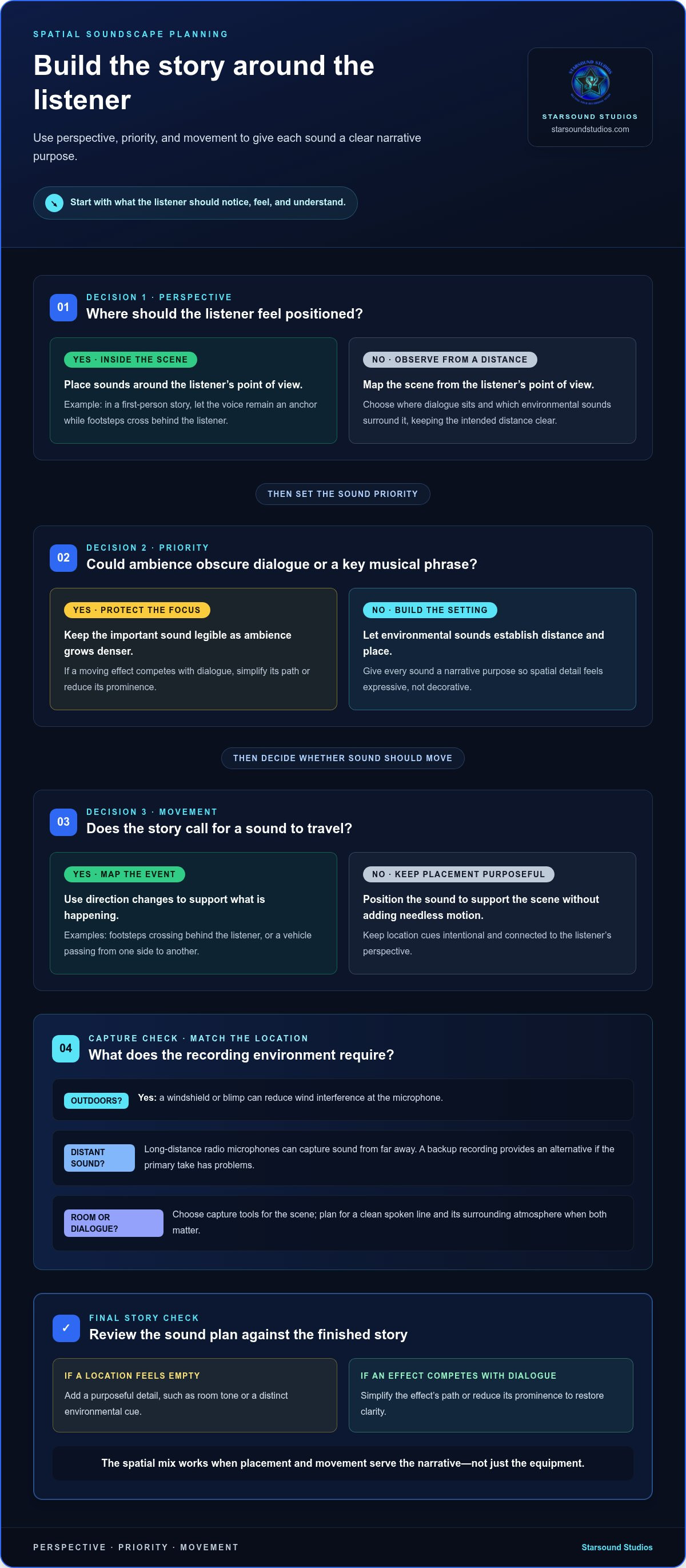
Start by deciding what the listener should notice, feel, and understand in each scene. In a forest sequence, birdsong might establish distance while a nearby branch crack draws attention. Give every sound a narrative purpose before choosing its position or movement. This keeps spatial detail expressive rather than decorative.
Map the scene from the listener’s point of view. Note where dialogue sits, which environmental sounds surround it, and when a sound should move. In a first-person story, a voice can remain the anchor as footsteps cross behind the listener. In a guided audio experience, a sound cue can signal a transition to the next location.
Build a sound plan around three connected decisions:
- Perspective: Decide whether the listener stands inside the scene or observes it from a distance.
- Priority: Keep dialogue or a key musical phrase legible when ambience grows denser.
- Movement: Use direction changes to support an event, such as a vehicle passing from one side to another.
Recording conditions shape the narrative palette. Outdoors, windshields or blimps can reduce wind interference at the microphone. Long-distance radio microphones can capture sound from far away, while a backup recording provides an alternative if the primary take has problems. For a scene built around distant dialogue, plan for both a clean spoken line and its surrounding atmosphere.
Review the plan against the finished story, not just the equipment. If a moving effect competes with dialogue, simplify its path or reduce its prominence. If a location feels empty, add a purposeful detail, such as room tone or a distinct environmental cue. Creators developing these listening skills can explore audio engineering classes as a way to strengthen their production understanding.
What equipment is needed for 360 audio production?
A 360-degree recording setup pairs suitable microphones with recording and monitoring tools that preserve spatial cues. The right combination depends on the scene: an indoor dialogue passage needs different capture choices from an outdoor environment or moving subject.
An ambisonic microphone captures sound from multiple directions, providing four or more audio channels for 360-degree production. This gives post-production spatial information to shape, rather than relying only on a conventional left-right recording. For example, a room recording can retain surrounding ambience alongside a central speaker, giving the editor more source material to work with.
Other equipment supports the recording from capture through review:
- Recorder and microphone inputs: Make sure the recording chain can capture the ambisonic microphone’s multiple channels together. Otherwise, the spatial information may not reach the editing session intact.
- Wind protection: A windshield or blimp reduces wind interference outdoors. That can help preserve a quiet spoken line or delicate ambience in an exposed location.
- Headphones and playback monitoring: Use monitoring to catch handling noise, uneven levels, or distracting movement. A passing vehicle, for example, should feel intentional rather than pull attention away from dialogue.
Camera placement also affects microphone choice. In 360-degree productions, a traditional boom microphone is often unusable because it would appear in the camera frame. The production team must therefore plan capture around the camera’s full view, using microphones that can record the intended perspective without intruding visually.
A compatible editing setup helps organize and shape the captured channels. Before recording, map each microphone to its track and label every source clearly. This simple step makes dialogue, ambience, and effects easier to identify in post-production. In a forest scene, for example, keeping birdsong distinct from a close spoken line preserves both atmosphere and intelligibility.
How much does 360 audio production cost in the United States?
There isn’t one flat rate for 360 audio production in the United States. Pricing depends on the work involved: recording, editing, spatial mixing, revisions, and delivery requirements. A short project with organized source tracks takes a different production path from a story requiring location capture, detailed sound design, and extensive post-production.
Format and session complexity also shape the estimate. A listed Level 0.5 delivery file contains 5 objects per track, while a listed Level 3 delivery file contains 24 objects per track. Object count alone doesn’t determine the fee, but it signals how much material the session may need to organize, position, and prepare. Clean, clearly labeled stems can also reduce setup work compared with scattered or incomplete source files.
To compare estimates meaningfully, outline the project before requesting a quote. Include:
- Scope: Describe the recording, editing, spatial mixing, and mastering tasks you need.
- Materials: Note whether you have finished tracks, separate stems, or need new recordings.
- Delivery: Name the intended format and identify any required versions or revisions.
- Creative direction: Explain the scene, listener perspective, and key sounds the mix should emphasize.
Pricing depends on the case and is provided after a quote request; scope, source-file condition, object count, recording needs, and delivery format influence the estimate. Send a concise project brief as a practical first step, so the requested work and deliverables are clear from the start.
If you want to build your understanding of production decisions before shaping a project, explore audio engineering classes. They can help you connect technical choices with the sonic result you want, from clean source preparation to a polished spatial narrative.
Starsound Studios: Stereo Mixing
Starsound Studios can help shape a finished stereo track or prepare music for immersive playback. Choose Stereo Mixing when your project needs a balanced, clear two-channel mix; Mastering adds a final polish to a completed mix. For a spatial listening experience, Dolby Atmos Mixing (9.1.4) offers a distinct production path, while Recording supports projects beginning at the source.
The right fit depends on your intended format and where you want the sound to place the listener. For a conventional stereo release, stereo mixing keeps the focus on the left-to-right image. For an Atmos mix, consider how spatial direction supports the music and listening experience. Starsound Studios, serving the greater Cleveland area from nearby North Royalton, brings these production choices into a focused creative process, guided by your artistic intent.
Contact Starsound Studios or visit the studio website to discuss your project.
Shape the Listening Experience You Envision
Define what you want the listener to feel, then choose a production path that serves that intention. A close, intimate mix creates a different connection from a soundscape that opens around the audience. Keep your creative goal at the center as you prepare tracks, references, and notes for collaboration.
Starsound Studios offers Stereo Mixing and Mastering for projects focused on a polished stereo release, alongside Dolby Atmos Mixing (9.1.4) for immersive listening. A conversation about your artistic direction can help connect the intended experience with the right production approach. If you’re seeking a 360 audio production studio in Cleveland, bring your vision and let the sound take shape from there.
Contact Starsound Studios to discuss your project. Your next sonic idea has room to become something distinctly yours.
Frequently Asked Questions
What is a 360 audio production studio?
A 360 audio production studio creates or shapes sound intended to feel surrounding, directional, or capable of movement. Unlike a conventional left-right mix, the sound design can make a listener feel positioned inside a scene. For example, a Cleveland audio drama might place a passing train behind the listener while keeping dialogue clear in front, tying sound placement directly to the story.
What services do 360 audio production studios offer?
Services vary, but can include recording, spatial mixing, stereo mixing, and mastering. In Cleveland, Starsound Studios offers recording, Stereo Mixing, Mastering, Dolby Atmos Mixing (9.1.4), Remote Mixing, and Remote Mastering. For instance, an artist with completed tracks can use remote mixing, while a project still developing its source material may begin with recording. Match the service to the stage your audio has reached.
How do you record and mix audio for 360-degree playback?
Start by defining the listener’s position, then capture dialogue, music, and ambience as organized, separate tracks. In the mix, place each element according to its role, keeping narration intelligible while environmental sounds establish a sense of location. Review the result on the intended playback setup, note any distracting shifts, and revise the balance or movement so spatial effects support rather than obscure the content.


