

What if a loudness-penalty reading says your track will be turned down, but your uploaded master hasn’t been changed? That’s the key to getting loudness penalty explained clearly: normalization estimates a playback gain adjustment, not a permanent edit to your audio file. Still, a negative number beside a finished master can raise practical questions about sound quality, impact, and whether you should revise your work.
LUFS, true peak, and playback loudness are easy to confuse, but they describe different things. A platform’s target is not a universal mastering specification. For example, Spotify’s default normalization target is -14 LUFS integrated, but a penalty estimate alone can’t tell you whether a louder or quieter master sounds best for your song.
This guide explains what normalization does during playback, how to interpret penalty estimates, and why true-peak headroom matters. You’ll also learn how to make loudness decisions without sacrificing dynamics, impact, or character to chase a number. The goal is a master that translates confidently across listening environments while staying true to the feeling you created.
Key Takeaways
- Get loudness penalty explained in context, so an estimate informs your release decisions without dictating how your master should sound.
- Learn what integrated, short-term, and momentary LUFS readings reveal about a track’s overall level and changing dynamics.
- Compare platform or tool estimates thoughtfully. Differences in measurement and playback behavior can lead to different readings.
- Use a practical pre-release check: measure the exported file’s integrated loudness and true peak, then listen before making changes.
- Recognize when a mastering engineer’s fresh perspective can help balance technical translation with the track’s impact and character.
Loudness penalty explained: what streaming normalization actually means
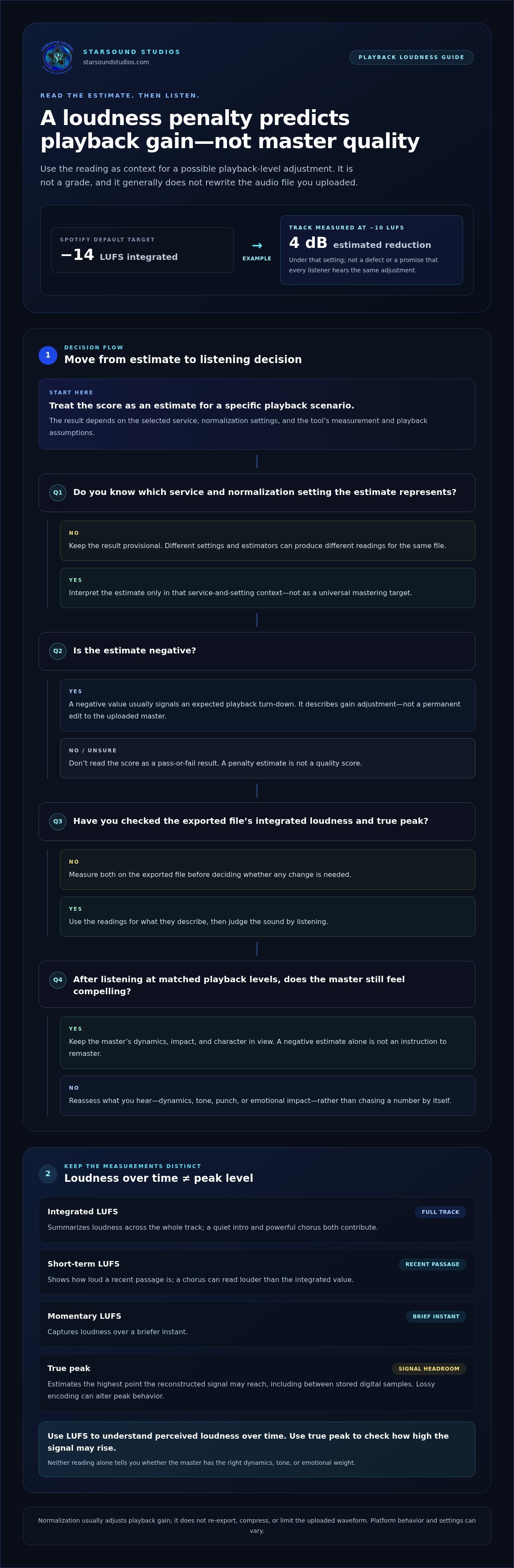
A loudness penalty estimates how much a streaming service may adjust a track’s playback gain to bring it closer to that service’s loudness reference. It describes a possible change in playback level, not a quality score and generally not a change to the audio file you uploaded.
For example, Spotify’s default normalization target is -14 LUFS integrated. A track measured at -10 LUFS could receive an estimated 4 dB reduction under that setting. That doesn’t mean the track is defective or that every listener will hear the exact same adjustment. Settings, platform behavior, and playback conditions can differ. Normalization manages relative playback levels; it doesn’t judge the artistic choices in a master. For background on the broader distinction between peak and loudness approaches, see Audio normalization.
A platform loudness estimate predicts a playback adjustment; it does not grade the quality of your master. A negative estimate alone can’t tell you whether the track’s dynamics, tone, punch, or emotional impact are working. Treat it as context for listening, not an automatic instruction to remaster.
What does a loudness penalty score represent?
The score generally shows the estimated difference between a track’s measured loudness and a service’s playback reference, expressed in decibels. A negative value usually signals an expected turn-down, not a universal pass-or-fail result. The estimate depends on the selected service, its normalization settings, and the tool’s measurement and playback assumptions. Different estimators can produce different readings for the same file.
Does normalization change the audio file?
Usually, normalization changes the gain applied during playback. It doesn’t re-export your master, compress it, or apply limiting to the uploaded waveform. A listener may hear the song at a different level because the service adjusts playback gain, even though that adjustment hasn’t rewritten the uploaded file. Streaming services may separately encode audio for delivery, so normalization and file encoding are distinct processes. Behavior can vary by platform and setting, so check current platform guidance before relying on a specific example.
In short, loudness penalty explained means an estimate of level adjustment under a particular playback scenario. Use the reading to understand what might happen, then judge the master by how it sounds and serves the song.
How LUFS, true peak, and loudness normalization work together
To interpret a normalization estimate, separate two questions: how loud the music feels over time, and how high its signal peaks. LUFS helps describe perceived loudness across a passage or the entire track. True peak estimates the highest point the signal can reach, including between the digital samples stored in the file. The measures are related, but they describe different aspects of the sound.
Think of LUFS as the overall impression of a room’s volume, and a peak as the loudest clap in it. A brief transient can reach a high peak without making the whole song feel loud. Conversely, a densely arranged track may feel consistently loud even if its highest peak isn’t exceptional. The ITU-R BS.1770 standard provides the foundational methods for measuring perceived loudness and true-peak level.
What does LUFS tell you about a song?
Integrated LUFS summarizes loudness across the full track, so both a quiet intro and a powerful chorus contribute to the result. Short-term LUFS shows how loud a recent passage is, while momentary LUFS captures a briefer instant. A chorus can read louder than the song’s integrated value. None of these measurements makes one LUFS target ideal for every genre, arrangement, or artistic direction.
Why true peak still matters
Digital audio stores samples, but the reconstructed waveform can rise between them. True-peak metering estimates those in-between peaks, which may matter when audio is encoded into a lossy format or converted for playback. Encoding can alter peak behavior, so a sample-peak reading alone may not show the full picture. Keep this technical headroom check separate from judging whether the normalized track still feels compelling.
LUFS tells you how loud the music feels over time; true peak tells you how high the signal may rise. A streaming service can use loudness measurements to determine a playback-level adjustment, while peak measurements help reveal whether the signal may run into problems during encoding or playback. Neither reading, on its own, tells you whether a master has the right dynamics, tone, or emotional weight.
That’s why “loudness penalty explained” shouldn’t turn into a hunt for one magic number. Use LUFS to understand average and changing loudness, and true peak to assess signal headroom. Then listen at matched playback levels. A quieter version can seem less exciting simply because it’s quieter, while an over-limited version may lose the movement that gives the track its character. If you want an experienced perspective on balancing delivery considerations with musical intent, professional mastering for streaming can help bring those decisions into focus.
How to interpret loudness-penalty estimates without chasing numbers
A loudness-penalty estimate is a clue about a possible playback adjustment, not an instruction to change your master. Read it alongside the selected service and measurement settings. For example, a tool estimating a 3 dB reduction suggests the track may play back quieter under that particular scenario. It doesn’t show how the song will feel in context or whether its mastering is successful.
What a penalty estimate can, and cannot, tell you
Different tools may use different measurement methods, assumptions, or platform settings, so their estimates won’t always match. Platform behavior and targets can also change. Treat any platform-specific figure as a snapshot, not a permanent rule. Use the reading to ask a focused question: if playback gain is reduced, does the track still carry its intended energy?
The estimate can’t assess emotion, tonal balance, translation across speakers, or arrangement. Those judgments require listening. Use this table to separate what the reading suggests from what it can prove:
| Reading | What it may suggest | What it can’t prove |
|---|---|---|
| Estimated gain reduction | The service may lower playback level under the selected assumptions. | That the master is poor or must be made quieter. |
| Little or no estimated adjustment | The measured loudness is near the tool’s selected reference. | That the track will sound better, translate well, or suit every platform. |
| Different results across tools | The tools may be using different references or measurement assumptions. | That one reading is automatically correct for every listening situation. |
Why louder is not automatically better
A louder version can seem more exciting in an immediate comparison simply because it’s louder. Match playback levels before deciding which version sounds better. Then listen for what matters: transient impact, vocal clarity, low-end balance, and whether the music still breathes.
Heavy limiting can reduce the contrast between hits and quieter moments, softening punch and making a mix feel less alive. That doesn’t mean limiting is always wrong. The tradeoff should serve the track. Eliminating every estimated adjustment isn’t the goal; preserving the song’s character is.
For a wider view of the decisions involved in final polish, explore this professional audio mastering guide. Use loudness estimates as context, then let level-matched listening guide the final call.
A practical workflow for checking loudness before release
A reliable release check connects the meter to the listening experience. Choose a reference platform, measure the actual final file, then decide whether any adjustment makes the song work better. This keeps a loudness-penalty estimate in its proper role: useful context, not the creative director.
Measure the final export, not an unfinished session
Small changes late in a project can affect the result. Measure the bounced release file after processing, fades, and file-format decisions are complete. Don’t rely on a reading from an earlier mix or a different master version.
- Choose a reference platform and setting. Focus on the service most relevant to your release, and use its current normalization behavior or setting as the basis for any estimate. Platform guidance can change, so verify the details rather than treating an old target as permanent.
- Open the final export in a reliable loudness meter. Measure integrated loudness across the full track and note the true-peak reading. Confirm that the meter analyzes the entire file, including its ending, rather than only a selected section.
- Record your measurement context. Write down the file version, meter, measurement mode, and selected platform setting alongside the readings. This makes comparisons meaningful and helps prevent one bounce’s estimate from driving changes to another.
- Review the platform estimate as a playback clue. An estimated gain adjustment can help you anticipate a level change, but it can’t tell you whether the master needs more limiting or less loudness. Avoid revising the track solely to make that figure disappear.
Listen for impact, translation, and unintended artifacts
Compare the master with relevant references at similar playback levels. A louder version can seem more impressive at first, so match levels as closely as practical before judging. Listen to the full track, then revisit demanding passages. Check transient clarity, vocal presence, low-end balance, and whether distortion or harshness persists.
- Make a musical decision. If a change improves the track’s impact, clarity, or translation without damaging its character, consider it. If it only improves a meter score, listen further before committing.
- Re-export and recheck after changes. Any final processing change creates a new file to measure. Confirm that the updated export is the version you intend to deliver.
This is the practical side of loudness penalty explained: measure carefully, use estimates as context, and let level-matched listening guide the final call. For a collaborative perspective on balancing technical delivery with the sound you want, explore professional mastering with Starsound Studios.
When a mastering engineer can help you make the final call
Metering and careful listening can take you a long way. If your final export measures as expected, sounds balanced across playback systems, and preserves the impact you intended, a loudness estimate alone may not be a reason to revise it. A self-check gives you control and can catch obvious issues.
A meter can report levels, but it can’t tell you whether a vocal feels emotionally present or whether the chorus opens up the way the song needs. If you’re unsure whether a technical adjustment is helping, or you’ve listened to the same master so often that your perspective feels stuck, a fresh, experienced listen can bring the decision back to the music.
Signs your master needs another listening pass
Listen for problems you can hear, not just a number that looks unfamiliar. Pumping that distracts from the groove, brittle transients, sustained distortion, or a vocal that feels buried or unbalanced may be reasons to reassess. Check the exported file on more than one playback system, such as headphones and speakers. If a concern follows the track across systems, that’s more useful evidence than a penalty estimate by itself.
How professional mastering keeps the song in focus
Mastering brings technical checks together with informed listening. The aim isn’t to force every track toward the same loudness, but to consider release requirements alongside the artist’s priorities: dynamics, tone, emotion, and translation. Project-specific decisions can preserve what makes a song feel alive while addressing issues that affect its final presentation.
That perspective is especially helpful when a meter reading and your ears seem to point in different directions. Understanding loudness penalty explained can clarify what a service may do during playback, but it can’t replace a musical judgment about whether the master still feels powerful, clear, and true to the performance. Starsound Studios provides stereo mastering and remote mastering, serving artists in the Cleveland area and worldwide.
For another perspective on your release, explore professional mixing and mastering services. Your master should meet its technical demands without losing the character that made the song yours.
Make the final call with confidence
Understanding loudness penalty explained puts a platform estimate in perspective: it predicts a possible playback-level adjustment, not the quality of your master. LUFS and true peak describe different parts of the signal, and neither can decide whether the track’s dynamics, tone, and emotional impact are right. Measure the final export, then listen at matched levels before making changes.
You don’t need to chase every estimated adjustment. The goal is a master that meets delivery needs while preserving what makes the song yours. Starsound Studios provides professional stereo mixing and mastering from North Royalton, Ohio, near Cleveland, with remote mastering available to artists worldwide. Work with Starsound Studios on your track’s final polish.
Use measurements to inform the process and your ears to keep the music at its center. Your song’s character is worth protecting.
Frequently Asked Questions
What is a loudness penalty?
A loudness penalty is an estimate of how much a streaming service may turn down a track during playback to bring its level closer to the service’s normalization reference. The phrase loudness penalty explained refers to that estimated gain adjustment, not a rating of your master. A negative reading doesn’t prove that your audio file has been changed or that the track sounds poor.
Does loudness normalization reduce the quality of a song?
Usually, loudness normalization changes playback gain rather than reprocessing the uploaded master, so the level adjustment itself doesn’t necessarily reduce audio quality. A track may sound quieter, but its dynamics and tonal balance aren’t automatically altered by that gain change. Separately, encoding and playback can affect audio, so check the delivered file and listen for distortion or other audible problems rather than assuming normalization has damaged the song.
Should I master my song to avoid a loudness penalty?
Don’t make mastering decisions solely to eliminate an estimated penalty. A loud master may be turned down, but that doesn’t automatically make it unsuitable. Reducing loudness with extra limiting can also diminish transients and movement. Measure the final export, check integrated loudness and true peak, then listen at matched levels. For a fresh perspective, Starsound Studios provides professional mastering in the Cleveland, Ohio area and remote mastering worldwide.
What is the difference between LUFS and true peak?
LUFS describes perceived loudness over time, while true peak estimates the highest signal level, including peaks between digital samples. Integrated LUFS summarizes the whole track; short-term and momentary readings focus on shorter passages. A dense song may have high overall loudness without the highest peak, while a sharp transient can peak strongly in a quieter mix. Use the measures to answer different questions, not as substitutes for each other.
Can a song have a loudness penalty and still sound good?
Yes. A penalty estimate indicates that playback gain may be reduced under a particular service setting. It can’t judge whether the song’s vocal feels present, the low end is balanced, or the arrangement builds with the intended emotional impact. Compare the master with references at similar playback levels, and listen on more than one system. If the track retains its character and translates well, the estimate alone isn’t a reason to change it.
Do all streaming services use the same loudness target?
No. Targets and normalization behavior differ across services and can change over time. As current examples, Spotify’s default normalization target is -14 LUFS integrated, while Apple Music normalizes to approximately -16 LUFS through Sound Check. A service may also offer user settings that affect playback. Treat platform figures as useful references, not universal mastering specifications, and check current service guidance before relying on a particular value.


